Stealthy offers you the ability to protect your privacy, and to avoid content filters imposed either by your company, school or even government. Stealthy is a browser plugin, available for Firefox and Chrome that will scour the web for free proxies and it will automatically configure them to protect your real identity, and it will also allow you to go places and see things that you normally wouldn’t be able to visit and enjoy, because you’d be blocked.
Schools and companies are known for blocking computer users on their networks from websites like Facebook, YouTube, Twitter, Flicker and all the other popular social hangouts. Why that is the case is pretty obvious, so that they don’t waste time on them. Some countries unfortunately have regimes, which are controlling which websites people are allowed to visit from their own homes, Iran and China would be great examples. Even some western countries have problems with this type of content censorship. Have you ever opened a YouTube music video only to receive a message that it is not allowed in your country due to copyright infringements? With Stealthy you can avoid all these problems, all that you have to do is install a small plugin in your favorite browser and click start.
Installing and using Stealthy in Firefox
There are instructions on the Stealthy project homepage about how you can install the plugin to Firefox on your desktop and also on Android Firefox, which means that you can use this anonymizing tool even on your smartphone.
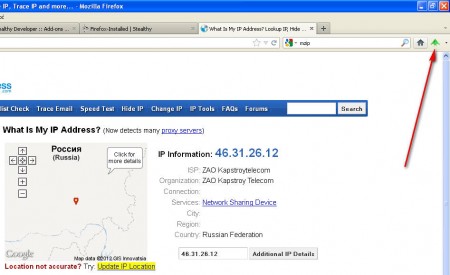
What you see on the image above being indicated by the red arrow is Stealthy. This icon in the browser toolbar is all that you will see from this program and you can activate it by clicking on it and making the icon turn to red. When Stealthy isn’t working the little airplane icon is red.

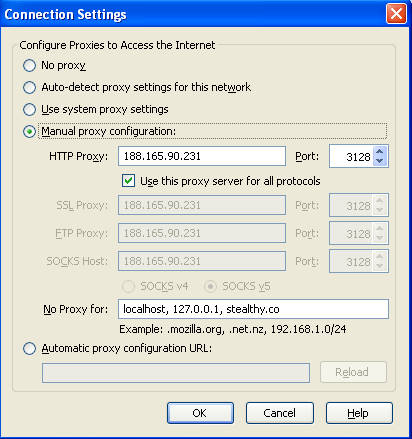
What Stealthy does can be seen if you open up Tools >> Options >> Advanced >> Network and select Settings. There you will see that Stealthy has configured your browser to use proxies and automatically filled in the proxy fields with the IP address and port number of a proxy that it has found:
Installing Stealthy in Google Chrome
If you are using Chrome and you are interested in changing the IP address that the world sees, then you need to install the Stealthy plugin for Chrome. It’s available for installation from the Chrome Web Store. After the installation is complete you will be offered to configure the basic Stealthy settings:
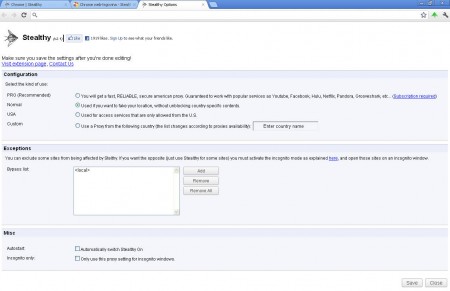
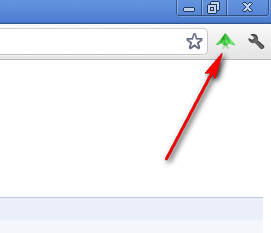
These are pretty basic settings, notice that you are offered the Pro version of Stealthy, there is a paid version of this plugin which offers better performance, here’s how Stealthy looks in Chrome:
Advantage of the paid version and conclusions
The Pro version of Stealthy offers you only top quality US based proxies, which will work for sure with social networks and sites. Free version adds random working proxies, from random countries, which might not always be the best choice because you are still blocked and censored, for example if you get German proxy, some YouTube videos will still not work. With paid version you avoid these kind of situations and also the proxies have better quality.
