• Home
  • Software Testing Service
  • About US
    • Privacy Policy
    • Disclosure
  • Write For Us
  • Submit Software
  • Contact Us
    • Subscribe
I Love Free Software
Best free software available all over the web. The free software categories include Windows Software, Social Networking Tools, and software installation videos.


  • Featured
  • Windows
  • Web Applications
  • App Store
  • Android
  • iPhone
  • iPad
  • Windows 8
  • Social Networking
  • Programming Tools

Enable Multiple Inboxes In Gmail

By Deepika Arora on November 30, 2011 | Sponsored Links

Let’s talk about a Gmail feature which allows you to view multiple inboxes at one time. Multiple Inboxes, wherein you can have multiple Gmail inboxes in your Gmail account. In simple words, you can have multiple inboxes showing all your important emails at the same time.
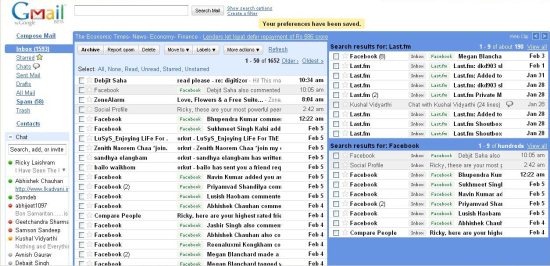
multiple inboxes
Sponsored Links

If you go onto “Settings” tab, you will find a navigation tab as “Multiple Inboxes” from where you can configure your list of new emails. This new Gmail feature, Multiple Inboxes, lets you make use of that extra space in your Gmail account.

Also check How to Enable Smart Labels in Gmail Account.

How To Enable Multiple Inboxes in Gmail:

  • Login to Gmail account
  • Click on “Settings Icon” given at the top right-side of the page
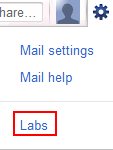
  • On the settings page, click on “Labs”
  • Under the column “Labled Labs”, you will find “Multiple Inboxes”. Select “Enable”
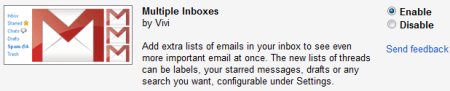
  • Click on “Save Changes” given at the bottom of the page.

Yup..there you are. It will show 2 new lists by default, but you can create more by going onto the settings tab. In addition you can even configure the number of emails that you want should appear in a single email list. You can create a separate email list for say your Facebook notifications, so you will be able to view your alerts or messages from Facebook in a separate window. Now wouldn’t that be wonderful.

You can also check out Ming.ly, a free service to access Facebook, Twitter and LinkedIn from Gmail.

“Multiple Inboxes” is a nice way to manage emails in your Gmail account. Go ahead and give it a try..!

Home Page: Click Here
Free / Paid: Free

Link to This Page:


You Might Also Like:

  1. How to Enable Smart Labels in Gmail
  2. How To Enable Google Calendar Gadget In Gmail
  3. How To Enable Google Translate In Gmail
  4. How to Check Gmail in Yahoo Mail
  5. How to Enable Priority Inbox in Gmail

Be the first to know about Latest Free Software:

  • Join us on Facebook
  • Subscribe to our RSS Feed
  • Follow us on Twitter
  • Subscribe to Email Updates:

Posted in Email Clients, Internet Tools | Tagged gmail, gmail account, gmail inbox | Leave a response

Deepika Arora

« Previous Next »

Featured Posts

  • 5 Free Snippet Managers To Manage Code Snippets
  • 5 Free Online Tools To Test Website In Different Resolutions
  • 5 Free Microsoft Access Alternatives
  • 5 Free IP Notifier Apps
  • 5 Online Mapping Websites
  • 5 Free Alternatives To iGoogle
  • 7 Websites To Download Windows 8 Themes
  • 5 Best Free Calculator Apps For Windows 8

Join More than 15,000 Followers!

Enter your Email Address
  • Submit Software
  • Software Testing Service
  • Write For Us
  • About Us
  • Privacy Policy
  • Disclosure
  • Contact Us

Link to Us:

Did we review your software here? Feel free to flaunt this badge on your website:

Free Software

Use this Code:

Copyright © 2013 I Love Free Software.

Powered by WordPress and Hybrid. New - H