• Home
  • Software Testing Service
  • About US
    • Privacy Policy
    • Disclosure
  • Write For Us
  • Submit Software
  • Contact Us
    • Subscribe
I Love Free Software
Best free software available all over the web. The free software categories include Windows Software, Social Networking Tools, and software installation videos.


  • Featured
  • Windows
  • Web Applications
  • App Store
  • Android
  • iPhone
  • iPad
  • Windows 8
  • Social Networking
  • Programming Tools

GoHere: Add Command Prompt Option to Context Menu

By Ishan Bansal on January 30, 2011 | Sponsored Links

GoHere is a freeware to run Dos prompts at any file or directory level. If you have a deep nested directory and want to run a DOS command on that, it is usually difficult to get the entire directory path in command prompt. This is the problem that GoHere solves.

GoHere adds an entry to context menu as “Go Here”. When you right click on any directory or file, and select this option, a command window will open at that directory level. Then you can quickly run any command in that, without a need to put entire directory path in command window manually.
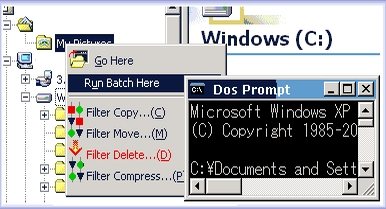
GoHere
Sponsored Links

GoHere also lets you execute any batch file for a directory or a file. For that, you can create your own custom batch file, and place that in install directory of GoHere in a folder titled “Batch”. If you have placed a batch file in this folder, GoHere will automatically show one more context menu entry titled “Run Batch Here”. This option will show all the batch files that are available in the batch directory. Just select this option and select the batch file that you want to run. GoHere will then pass drive name, directory name, and file name to the batch file, and will execute that.

Nowadays we seldom need to run commands at command prompt, but in case you have to do that often, then GoHere is a good option. One use that directly comes to my mind is usage with utilities like PNGOUT. Also check out WhoIS Utility.

Download GoHere.

Home Page: Click Here
Works With: Windows
Free / Paid: Free

Link to This Page:


You Might Also Like:

  1. Color Console: Add Color to Command Prompt
  2. Find WhoIs Information from Command Prompt
  3. Modify “Send To” Right Click Option: Send To Toys
  4. Free Windows Right Click Context Menu Editor: ShellMenu View
  5. Automatic and Batch PDF To HTML Converter

Be the first to know about Latest Free Software:

  • Join us on Facebook
  • Subscribe to our RSS Feed
  • Follow us on Twitter
  • Subscribe to Email Updates:

Posted in Programming Tools | Tagged command line tool | Leave a response

Ishan Bansal

« Previous Next »

Featured Posts

  • 5 Free Snippet Managers To Manage Code Snippets
  • 5 Free Online Tools To Test Website In Different Resolutions
  • 5 Free Microsoft Access Alternatives
  • 5 Free IP Notifier Apps
  • 5 Online Mapping Websites
  • 5 Free Alternatives To iGoogle
  • 7 Websites To Download Windows 8 Themes
  • 5 Best Free Calculator Apps For Windows 8

Join More than 15,000 Followers!

Enter your Email Address
  • Submit Software
  • Software Testing Service
  • Write For Us
  • About Us
  • Privacy Policy
  • Disclosure
  • Contact Us

Link to Us:

Did we review your software here? Feel free to flaunt this badge on your website:

Free Software

Use this Code:

Copyright © 2013 I Love Free Software.

Powered by WordPress and Hybrid. New - H