Perfect Automation is a free automation software that allows users to automate the tasks that they normally do on PC. You can record keyboard and mouse actions related to any particular activity, and then repeat them quickly whenever you want to. If you have used macros in Excel, then this is the PC version of that. Some other related software we reviewed earlier are Firefox macro plugin, Actions, and Do it Again.
It is said that having perfect Automation on your computer will save you money and well as time, thus increasing productivity. Indeed, this free macro software would be ideal for the busy business person who is trying to balance their work schedule. Perfect Automation is made up of a launcher, a scheduler, a mouse and keyboard recorder and a script editor. All these applications are in the one program, so there is no need to download separately. A single icon sits on the task bar giving users access with the click of the mouse.
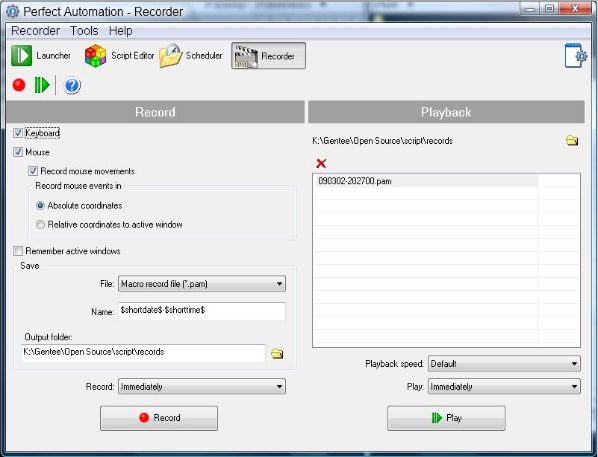
Let’s now look at each of the features and their functions:
The Script Editor:
- Allows and aids the user in automating any kind of task.
- Creates excellent executable files that have no external dill files
- A vast supply of visual commands as well as the usual array of built-in functions, allow for professional script editing.
- There is access for other to add their own visual commands; a source code of commands makes this feature available.
- Ideal for beginners as no programming is required. And is also an excellent application for advanced users.
- Indeed, using free script editing will no doubt improve the documents, etc that users create.
Keyboard and Mouse Recorder:
- Is able to create executable files and other types of files for the script editor.
- Macro files can be built and run separately in any task the script editor is working on.
- The feature keeps track of active windows and is able to access them and open them when required.
- This function clearly works in conjunction with the script editor and enables the user to perform a slew of different tasks.
Also check out free mouse and keyboard recorder that we reviewed earlier.
The Launcher:
- A shortcut manager enables users to shift between files smoothly and easily.
- Launcher will open websites, documents, files and other programs whenever required by the user.
- Hotkeys, keywords or system tray menus are able to be operating continuously.
- Able to handle unlimited user sub-folders and the like.
- Clearly the launcher is something user would find very useful. The final feature of this free application or tool is the scheduler.
Scheduler:
- This program will start and run other programs at various predetermined times.
- Works in conjunction with the Launcher.
- Operates using hotkeys as well as others.
Perfect Automation is an easy to use program to record and automate tasks.
Perfect Automation is a freeware application that allows users to perform various tasks all from within the program. It is said that having perfect Automation on your computer will save you money and well as time, thus increasing productivity. Indeed, this free application would be ideal for the busy business person who is trying to balance their work schedule. Perfect Automation is made up of a launcher, a scheduler, a mouse and keyboard recorder and a script editor. All these applications are in the one program, so there is no need to download separately. A single icon sits on the task bar giving users access with the click of the mouse. Let’s now look at each of the features and their functions:
The Script Editor:
Allows and aids the user in automating any kind of task.
Creates excellent executable files that have no external dill files
A vast supply of visual commands as well as the usual array of built-in functions, allow for professional script editing.
There is access for other to add their own visual commands; a source code of commands makes this feature available.
Ideal for beginners as no programming is required. And is also an excellent application for advanced users.
Indeed, using free script editing will no doubt improve the documents, etc that users create. The next application within this free Perfect Automation application is the –
Keyboard and Mouse Recorder:
Is able to create executable files and other types of files for the script editor.
Macro files can be built and run separately in any task the script editor is working on.
The feature keeps track of active windows and is able to access them and open them when required.
This function clearly works in conjunction with the script editor and enables the user to perform a slew of different tasks.
The Launcher:
A shortcut manager enables users to shift between files smoothly and easily.
Launcher will open websites, documents, files and other programs whenever required by the user.
Hotkeys, keywords or system tray menus are able to be operating continuously.
Able to handle unlimited user sub-folders and the like.
Clearly the launcher is something user would find very useful. The final feature of this free application or tool is the scheduler.
Scheduler:
This program will start and run other programs at various predetermined times.
Works in conjunction with the Launcher.
Operates using hotkeys as well as others.
