• Home
  • Software Testing Service
  • About US
    • Privacy Policy
    • Disclosure
  • Write For Us
  • Submit Software
  • Contact Us
    • Subscribe
I Love Free Software
Best free software available all over the web. The free software categories include Windows Software, Social Networking Tools, and software installation videos.


  • Featured
  • Windows
  • Web Applications
  • App Store
  • Android
  • iPhone
  • iPad
  • Windows 8
  • Social Networking
  • Programming Tools

Free AVI to DVD Converter from Modiac

By Deepika Arora on September 29, 2011 | Sponsored Links

Modiac AVI to DVD converter is a free software that enables you to convert AVI Video Files to DVD file format. This free AVI to DVD converter provides active converting speed with high sound quality. You can crop video files and convert only the selected section into DVD format. You can also personalize the DVD menu by selecting from preset templates.

The Modiac Video Converter can not only convert AVI to DVD with original quality and high speed, but also convert AVI to VCD, AVI to WMV, AVI to 3PG, and AVI to MPEG. These formats are supported by next-generation mobile devices, such as iPod, iPhone, iPad, PS3, Xbox 360 and many more. It can even extract audio from video files.

In addition, you can cut short video files and can convert just the selected sections to DVD file format. Furthermore, this free AVI to DVD converter has capability of converting multiple videos simultaneously.

Lets check how to convert AVI to DVD using Modiac:

  • Begin with either adding AVI file or select DVD as output format first.
  • Select DVD 4G or DVD 8G under “Converter Mode”
  • It will quickly covert AVI file to DVD format

However, if you want to play around with more options, select “DVD” and click on “Advanced” button. For example: If you want to convert more than one AVI file to DVD format, you can select the AVI files together at one time. Modiac avi to DDVD will merge them into one and convert it for playing.

Here is how to download Modiac AVI to DVD converter:

  • Go onto the website
  • Click on “Download”
  • Double-Click on the downloaded icon in order to run
  • The installer will automatically installs the Modiac AVI to DVD Converter freeware.

There your are. Start converting files. You can take a look at an image below in order to get familiar with it:
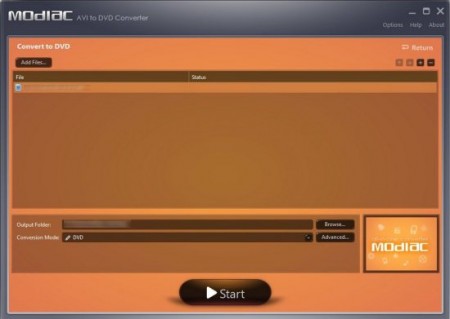
Modiac Free AVI to DVD Converter1
Sponsored Links

You can also view some similar topics reviewed by us: Video Files to HD format, and Video Converter.

In short, Modiac AVI to DVD Converter is an outstanding free Avi to DVD converter software that can convert almost every file. Give it a try, download Avi to DVD converter for free.

Home Page: Click Here
Works With: Windows
Free / Paid: Free

Link to This Page:


You Might Also Like:

  1. Free Total Video Converter: Sothink Video Converter
  2. All-In-One Video Converter: Green Free Video Converter
  3. Free FLV Converter: Leawo Free Video to FLV converter
  4. Download Audio Converter Free: Moo0 Audio Converter
  5. Free Video to DVD Converter

Be the first to know about Latest Free Software:

  • Join us on Facebook
  • Subscribe to our RSS Feed
  • Follow us on Twitter
  • Subscribe to Email Updates:

Posted in Audio Video Converters, MP3 & Audio Software | Tagged avi file, avi files, avi video files, convert video files, dvd, free avi to dvd converter, free video converter, iPhone, video file, Video files | Leave a response

Deepika Arora

« Previous Next »

Featured Posts

  • Top 7 Free Launchers for Android
  • 5 Free Snippet Managers To Manage Code Snippets
  • 5 Free Online Tools To Test Website In Different Resolutions
  • 5 Free Microsoft Access Alternatives
  • 5 Free IP Notifier Apps
  • 5 Online Mapping Websites
  • 5 Free Alternatives To iGoogle
  • 7 Websites To Download Windows 8 Themes

Join More than 15,000 Followers!

Enter your Email Address
  • Submit Software
  • Software Testing Service
  • Write For Us
  • About Us
  • Privacy Policy
  • Disclosure
  • Contact Us

Link to Us:

Did we review your software here? Feel free to flaunt this badge on your website:

Free Software

Use this Code:

Copyright © 2013 I Love Free Software.

Powered by WordPress and Hybrid. New - H