• Home
  • Software Testing Service
  • About US
    • Privacy Policy
    • Disclosure
  • Write For Us
  • Submit Software
  • Contact Us
    • Subscribe
I Love Free Software
Best free software available all over the web. The free software categories include Windows Software, Social Networking Tools, and software installation videos.


  • Featured
  • Windows
  • Web Applications
  • App Store
  • Android
  • iPhone
  • iPad
  • Windows 8
  • Social Networking
  • Programming Tools

DayHiker Extension for Google Chrome

By Ishan Bansal on December 29, 2010 | Sponsored Links

DayHiker is another extension for Google Chrome which will increase your productivity in front of the computer. Basically it’s a simple way of checking your Google calendar without the need of going to the website. However, DayHiker brings way more things to the table. Giving the user a handful of useful links this extension for google chrome is perfect for those who need help with organizing their lives.

Featuring many interesting things including a nice alarm clock to remind you of your tasks DayHiker has proved to be the extension when it comes to calendars. Add your own tasks, check your next meeting, cancel appointments, check the weather. Everything and much more with this great extension for Google Chrome.
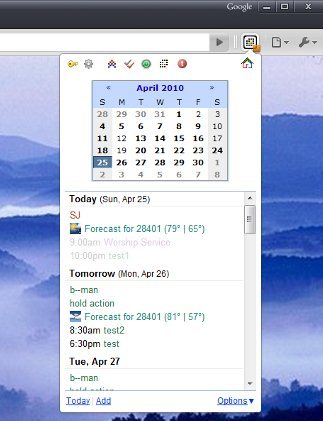
DayHiker Chrome Extension
Sponsored Links

How to Use DayHiker Extension For Google Chrome

Using DayHiker extension is quite simple. After installing the extension an icon should show up next to your address bar as usual. Click the icon and a calendar show show up with all your tasks for the following days. You can quickly add tasks by clicking on the corresponding option which should be on the bottom of your window. Also at the upper part of your window there should be several icons. Take your time to find out their functions. Among them however, there should be the Alarm Clock function. Click it and you can set up a little alarm clock.

Also check out other free Chrome Extensions.

Features of DayHiker Extension for Google Chrome

  • Quickly check your calendar.
  • Quickly add tasks.
  • Check the weather.

Download DayHiker Google Chrome Extension here.

Home Page: Click Here
Works With: Google Chrome
Free / Paid: Free

Link to This Page:


You Might Also Like:

  1. Weather Extension For Google Chrome: Stormcloud
  2. Google Share Button Chrome Extension
  3. Panic Button Google Chrome Extension
  4. Broken Link Checker Extension for Google Chrome
  5. Firebug Lite Extension for Google Chrome

Be the first to know about Latest Free Software:

  • Join us on Facebook
  • Subscribe to our RSS Feed
  • Follow us on Twitter
  • Subscribe to Email Updates:

Posted in Plugins | Tagged google chrome, google chrome extension | Leave a response

Ishan Bansal

« Previous Next »

Featured Posts

  • Top 7 Free Launchers for Android
  • 5 Free Snippet Managers To Manage Code Snippets
  • 5 Free Online Tools To Test Website In Different Resolutions
  • 5 Free Microsoft Access Alternatives
  • 5 Free IP Notifier Apps
  • 5 Online Mapping Websites
  • 5 Free Alternatives To iGoogle
  • 7 Websites To Download Windows 8 Themes

Join More than 15,000 Followers!

Enter your Email Address
  • Submit Software
  • Software Testing Service
  • Write For Us
  • About Us
  • Privacy Policy
  • Disclosure
  • Contact Us

Link to Us:

Did we review your software here? Feel free to flaunt this badge on your website:

Free Software

Use this Code:

Copyright © 2013 I Love Free Software.

Powered by WordPress and Hybrid. New - H