Pageflip OpenOffice To Flash software software allows you to convert your openoffice format files to a flipping book using flash. It is an absolutely free software and allows the user to create a book with animations and flipping sound from openoffice format files. The user will be able to create digital books, catalogs and magazines that actually behave like books. The Pageflip OpenOffice To Flash software is immensely user friendly and the user need not have any programming skills. You can use this flash book anywhere and even publish it on the internet without having to pay anything. It is smart, unique and efficient software which is also free.

Features of this OpenOffice to flash converter
- The software is a freeware. This implies that the user can download it for free and use it without having to shell out money.
- This openoffice to flash conversion software is compatible with the following operating systems: Windows 7, Windows XP, Windows Vista, Windows 2000, Windows NT, Windows 98, Windows 2003, WinME.
- The Pageflip OpenOffice To Flash software system requirements are pentium or a similar processor and minimum 64 mega byte of RAM.
- The user can choose the format of the output file from a list. The list contains html file format, zip file format and .exe file format.
- The user needs to install GhostScript (a software which converts PostScript files to PDF files and vice versa) before using this software.
- The user can also use the command line to enter the interface if he or she does not want to use Windows Desktop.
- The user can directly share the book created through e-mail and social networking sites.
- The Pageflip OpenOffice To Flash software allows the user to insert a watermark in their creation so that no one else can modify or copy it.
- The best part of the software is that the user does not need to have any programming skills or know the details of adobe flash. The best usage of data encapsulation that one has ever seen.
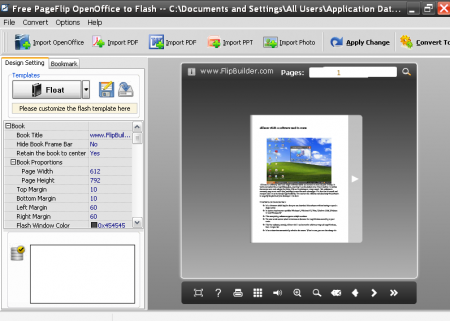 Interface and working of this freeware
The interface looks very complicated and confusing at the first glance. This is because the trial version of the PageFlip OpenOffice To Flash software (which allows all kinds of office files including microsoft office files and PDF files and photos) is available as Pageflip OpenOffice To Flash software. So you will find a lot of options, buttons and features which will not work as this is basically the trial version.
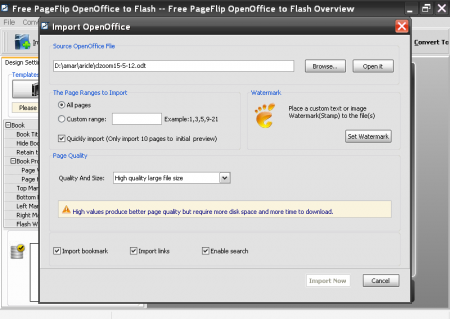
The only useful buttons are import OpenOffice format file, import and save templates and convert to other formats. You need to import the OpenOffice file which will take a few seconds. Though you will find the convert to flipping book option everywhere conversion takes place automatically. You will find your book ready and now you can save it.
Downloading and installing OpenOffice to Flash converter
The Pageflip OpenOffice To Flash software can be downloaded from the official website for free. The .exe file then has to be executed and the program has to be installed. The installation can take time so you have to be patient.
Final Verdict
The Pageflip OpenOffice To Flash software is an innovative tool to convert your OpenOffice files to flash. Though the interface is really messed up and confusing the end results are more than satisfactory.
