PC Brother System Maintenance is a free, all-in-one system maintenance freeware that helps the user to take care of the PC, and maintain it thereby producing a fine system performance. It comes loaded with a number of tools and options that enable the user to control and optimize the various components of the system. Another important feature is that the user need not worry about the viruses in the system. PC Brother system care comes with in-built system security features, that manages the security and reminds the user about the updates that are to be made regularly.
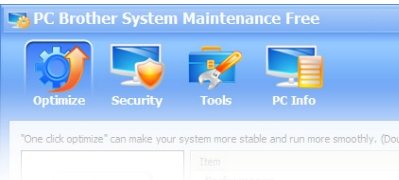
The software’s main interface screen has four prominent tabs each of which perform a function.
Here are the main functions of PC Brother System Maintenance:
Optimize:
PC Brother system care optimizes the computer’s performance, appearance and network security features. Some of the optimization tasks are, increasing the background work threads to make the system run faster, Speeding up the system refreshing thereby, improving the system’s performance, optimizing the NTFS file system and auto defragmentation to make the file system function more efficiently. And as far as the system updates are concerned, a coding scheme is used to indicate the necessity of updates on certain components of the PC for a better performance.
Also check out free PC Speed up software.
Security:
Detect the security settings in place and notifying them to the users to make them aware about the security level of the system and the setting changes that are to be made to make the system more secure. The security center collects information about the system’s antivirus, Firewall settings, System Updates and shared resources. A color code is used to display the level of vulnerability of the system to network and security threats. The updates that need to be performed are indicated as Optional updates, Necessary updates and security updates.
Tools:
The tools tab detects the unneeded processes that can be terminated. This lists a number of options to terminate the redundant processes using critical resources unnecessarily, disabling auto runs, processes, services and even connections with other systems , in order to enhance system performance.
PC Info:
The computer’s general information is listed in this window. This includes the statistics like disk usage, performance graphs and reports, system information, Hardware and software versions and information about drivers etc.
PC Brother system maintenance comes from the makers of PC Brother Registry cleaner, and PC Brother System Care.
The user can export the general information to be stored as a reference. Further after updates are made, the user can refresh the PC info Window to display the latest configurations of the system.
All these features and options make PC Brother System Maintenance, a feature-rich utility to enhance the system’s performance. Download PC Brother System Maintenance free.
