List.It is a free and open source note keeping software that lets you quickly jot down notes, and keep them in sync across multiple computers. List.It installs as a Firefox plugin, and is an extremely easy to use free notes software.
I have reviewed some interesting free notes taking software, like Evernote, and CintaNotes. Let me admit, I find these more feature rich that List.It. But what really attracted me about List.It free notes taking software is it’s ease of use.
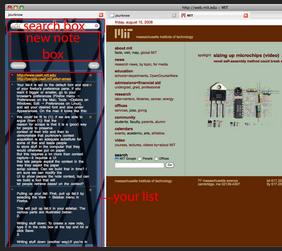
List.It installs as a Firefox plugin. On installing List.It, you are prompted to create free account on List.It website. This account is then used to keep your notes in sync across multiple computers.[subscribe-to-us]
To take notes, you just click the List.It icon at bottom of your Firefox. It will immediately open a small text box in which you can jot down your note quickly.
To see any of your notes, just click on the same icon, and it will open a window on the side that will show all your notes. You can search your notes, and even reorder them. Your changes will be synced across all your computers.
If you do not need a sophisticated notes taking application, and just need something very simple, List.It is a pretty good choice. If you are looking for electronic sticky notes for your computer, try Stickies.