InSight Desktop Search is a simple free file search engine that helps you find files for free on your computer. InSight Desktop Search has a beautiful, intuitive and robust interface that should please everyone.
Also, according to the developers, InSight Desktop Search finds the file you’re looking for before you end typing. As if that is not enough, this free search tool also searches Wikipedia articles and has its own built-in jukebox. The list of amazing features this free file search engine has could go on and on so download it and find out how incredible this software truly is.
InSight Desktop Search is certainly the best replacement for Windows’ default search system, beating its competitors like Hulbee Desktop. As a matter of fact after downloading this great software one can simply toggle off Windows search.
How to Use InSight Desktop Search:
The first thing you need to do after downloading and installing InSight Desktop Search ree file search engine is choose what parts of your hard drive you want to index. To do so just click on the icon on the upper right side of the window and choose which partitions you want to index. Indexing your files might take a few minutes depending on the amount of files you have.
After the indexing process is concluded you can already use InSight Desktop Search. In order to use the free search tool, just hover your mouse over the clock which should show up after you install the program. When the window shows up you can easily find files for free.
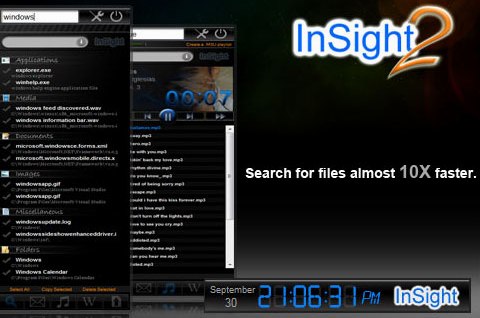
As you might have noticed, InSight Desktop Search has several filters. If you are looking for an specific file and want to narrow down your results, simply use the corresponding filter. Another nice feature is the built in jukebox. Whenever you search for a mp3 file you can listen to it right from InSight Desktop Search by clicking on “play”.
Features of InSight Desktop Search:
- Quickly find millions of files in your computer.
- Built in jukebox.
- Robust yet simple interface.
InSight Desktop Search is probably the best of the free desktop search tools we have seen, but the alternatives have benefits to. For document searching, it is well worth giving DocFetcher a try and if simplicity is what you want, then Everything Search Engine is good for you.
