• Home
  • Software Testing Service
  • About US
    • Privacy Policy
    • Disclosure
  • Write For Us
  • Submit Software
  • Contact Us
    • Subscribe
I Love Free Software
Best free software available all over the web. The free software categories include Windows Software, Social Networking Tools, and software installation videos.


  • Featured
  • Windows
  • Web Applications
  • App Store
  • Android
  • iPhone
  • iPad
  • Windows 8
  • Social Networking
  • Programming Tools

Kidpaint: Free Coloring Software for Kids

By Mayank on November 28, 2010 | Sponsored Links

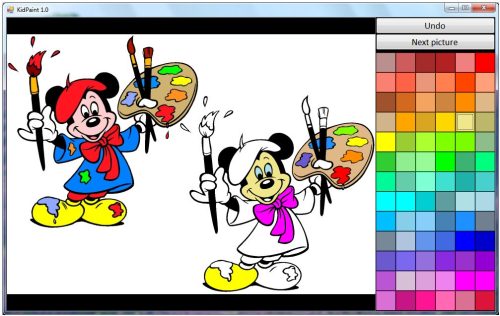
Kidpaint is a free coloring software for kids by which your kid can easily learn all the basic fundamentals of painting. Painting skills of your child will be improved by using this coloring application designed especially for young children. This helpful coloring application is a must for all the young kids to make their basics clear about painting. You can also teach your kids easy programing language through Scratch.

You can use this coloring software, Kidpaint on any windows operating system. This free painting application, Kidpaint is very small is size and you can easily use it anywhere and store it in a small USB drive as small as 64 MB of space. You can also try Tux Paint, and FlowPaint for painting for kids on computer.
KidPaint
Sponsored Links

This software has a free license, so it can be used for free and is a great application for making your kid’s painting skills good.

How to Use Free Coloring Software KidPaint:

You just have to visit the Kidpaint website and click on the download button. This application is very small in size i.e. only 2.8 MB and can be stored in a small pen drive also which can be used remotely. Now once you are done click on the install button for installing this application, Kidpaint and once your done with this step, Kidpaint will be installed on your PC.

Now this free coloring software has a very easy to use interface. When you open this application there are two pictures one is filled with color and is complete and other is incomplete which has to be filled by your kid. So you can choose from a list of colors available on the right hand side and fill that uncolored picture using those colors. Just select the color you want to use and then click on the part of the picture where this color has to be filled.

Kidpaint is a fun coloring application to make your kids learn painting skills.

Home Page: Click Here
Works With: Windows
Free / Paid: Free

Link to This Page:


You Might Also Like:

  1. Online Coloring Pages for Kids: Click 2 Color
  2. Free Photo Coloring Software: InstantPhotoColor
  3. Print Coloring Book with Coloring Book Pages
  4. OOo4Kids: Free Office Suite for Kids
  5. Android App for Kids to Learn Colors: Learning Colors For Kids

Be the first to know about Latest Free Software:

  • Join us on Facebook
  • Subscribe to our RSS Feed
  • Follow us on Twitter
  • Subscribe to Email Updates:

Posted in Image & Photo Editors | Tagged drawing software, free software, kids | Leave a response

Mayank

« Previous Next »

Featured Posts

  • Top 7 Free Launchers for Android
  • 5 Free Snippet Managers To Manage Code Snippets
  • 5 Free Online Tools To Test Website In Different Resolutions
  • 5 Free Microsoft Access Alternatives
  • 5 Free IP Notifier Apps
  • 5 Online Mapping Websites
  • 5 Free Alternatives To iGoogle
  • 7 Websites To Download Windows 8 Themes

Join More than 15,000 Followers!

Enter your Email Address
  • Submit Software
  • Software Testing Service
  • Write For Us
  • About Us
  • Privacy Policy
  • Disclosure
  • Contact Us

Link to Us:

Did we review your software here? Feel free to flaunt this badge on your website:

Free Software

Use this Code:

Copyright © 2013 I Love Free Software.

Powered by WordPress and Hybrid. New - H