GSplit is a free file utility that helps you to split your big files into smaller files called pieces like zip archives or self-extracting archives. If you want to send big file to your friend over the internet or want to copy to any removable memory drive, you can try this free file splitter. Now you don’t have to worry about sending big files via instant messaging, online hosting services or email as you have GSplit to help you. You can easily split large files and send them over the internet.
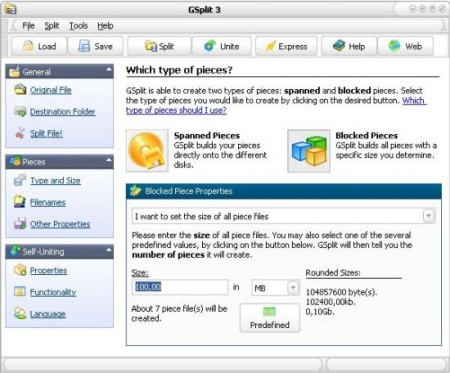
You can split your files in two different ways, disk spanned or blocked. If you want to split files on your available free disk space then you should go for the disk spanned option. GSplit will automatically calculate the free disk space and split files accordingly. If you want to split files and create a set of same sized files, you should try the blocked option. This free file splitter also works as a file joiner, You can use this small freeware to join all the pieces back together. You can also perform fast checks to check CRC32, offset and size to detect corrupted files. It also helps you to make sure that your files can be successfully restored by a user.
This free file splitter comes with simple and intuitive user interface and can split large files bigger than 4 GB. You can split multiple files at the same time to save time. This free file utility is available in multiple languages so you can use this software in your own language. You can keep track of estimated and elapsed time while uniting or splitting files with this freeware. You can also pause the splitting operation if you want. If you don’t want to install this software, you can download the portable version of this great free file splitter.
If you are looking for a software to split PDF files, you can try Junko, Adolix Split Merge PDF and I Love PDF reviewed by us.
Features of GSplit:
- Split big files bigger than 4 GB
- Detect corrupted files by performing fast checks
- Two different file splitting options to choose from
- Available in multiple languages
- Supports all Windows OS
GSplit is available for download gdgsoft’s website. It’s only 1506 KB in size and supports all Windows OS. Download GSplit Free.
