Wally is a free software to change wallpaper automatically. Wally allows you to play around with your desktop or mobile background. The free wallpaper changer allows you some relief from the boring and “always there” wallpaper. This automatic wallpaper changer is loaded with features which allow you to have fun on your desktop. Wally allows you to put your preferred images. You can set timing between wallpaper changes. The size can be changed as well.
While Wally isn’t the only free software out there, it has a lot of options which makes it a powerful tool. If you are interested in other wallpaper changers, you could try BingRounder or Scrollwall which we found interesting. Wally can use images from your files and folders, FTP remote folders, Picasa, photobucket, Flickr, Yahoo!, Smugmug and a lot of many other photo sharing websites. I would particularly recommend this wallpaper changer for the non-techie types who want it simple.
For those who want to tweak around a bit more with their wallpaper changer, I would suggest Wallcast which allows you to customize your wallpaper images to your preferences.
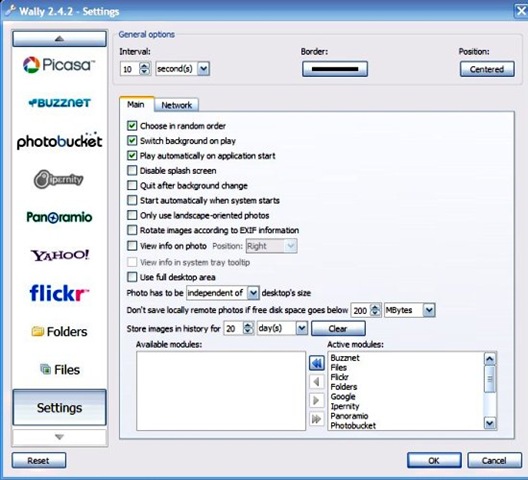
Features :
- Runs on all the known platforms, Windows OS, Mac and other Linux platforms.
- Wally provides you proxy support.
- Wally maintains history of all the images used.
- Saves downloaded photos.
- EXIF data is available in the image itself. It is also available in the system tray.
- Available in 15 languages.
- Wally has a Qt 4 enabled platform, this free wallpaper changer is one of the rare ones to have them.
Requirements for Installing Wally :
- Qt 4 on your Nokia phones (greater than version 4.6.0).
- Windows 2000/ Windows XP OS for Windows users. Disable Active Desktop.
- Mac OSX Snow Leopard for Mac users. Disable Change Picture feature.
- libexif (optional). libexif is a software library for C language.
How to Install Wally :
- Visit the website.
- Click on Download it. It is a winzip download.
- After you have downloaded the file, lookup the zip folder for a .exe file. Double clicking on the file installs it to your PC.
- Launch from the system tray or the Wally manager. Click on settings for customizing Wally to your taste.
In Short, Wally is an automatic wallpaper changer available for free. It is a must have. All you can say about this wallpaper changer is, “Amazing, Isn’t it!”
