• Home
  • Software Testing Service
  • About US
    • Privacy Policy
    • Disclosure
  • Write For Us
  • Submit Software
  • Contact Us
    • Subscribe
I Love Free Software
Best free software available all over the web. The free software categories include Windows Software, Social Networking Tools, and software installation videos.


  • Featured
  • Windows
  • Web Applications
  • App Store
  • Android
  • iPhone
  • iPad
  • Windows 8
  • Social Networking
  • Programming Tools

Free Packet Sniffer: WebSiteSniffer

By Deepika Arora on September 27, 2011 | Sponsored Links

WebSiteSniffer is a free packet sniffer that seizes all the basic statistics of the applications you downloaded while browsing the Internet, and backlogs them right on your PC’s hard drive under a specified folder.

This excellent packet capture windows app allows you to choose the type of Website files to be captured such as Text Files, HTML Files,  CSS Files, XML Files, Images, Video/Audio Files, Flash (.swf) files, or Scripts.

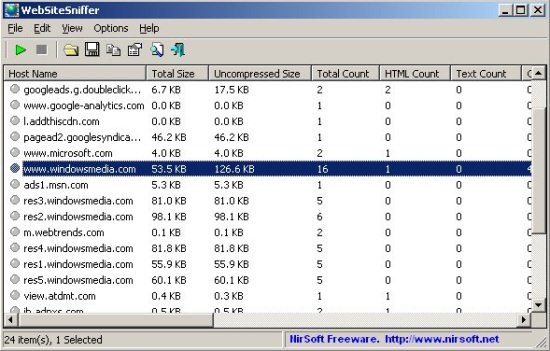
While grasping the downloaded files, the main window of this packet sniffer displays general statistics of each downloaded file such as size, number of files for each file type like Images, Text, HTML and so on.
000
Sponsored Links

The best part is that WebSiteSniffer doesn’t require any installation. However, in order to get started with this packet sniffing software, you need to give a couple of minutes to its downloading process.

Basic System Requirements:

WebSiteSniffer works well with any version of Windows, starting from Windows 2000 and up to Windows 7, including 64-bit systems.

How to Download Packet Sniffer: WebSiteSniffer

  • Go onto the below linked website
  • Scroll down, under the “Feedback” column, Click on “Download WebSiteSniffer” (You can select either 32-bit version or x64 version, whichever version is compatible with your system )
  • Double-Click on the downloaded icon
  • Since it is a Zip-File, hence you need to extract in order to unzip. Therefore, Click on “Extract All” given at the navigation bar.
  • Click on “Extract”
  • You will soon find your file extracted. Simply run the executable file – WebSiteSniffer.exe.

Yup…there you are. Quickly start capturing all the statistics of your downloaded files. This free packet analyzer is highly recommended if you want to know more about the software you have downloaded .

You can also check  Network Packet Sniffer reviewed by us.

In short, WebSiteSniffer is an excellent network sniffer that captures statistics of all the downloaded files. Go ahead and Download WebSiteSniffer Free!!

Home Page: Click Here
Works With: Windows 2000 to Windows 7
Free / Paid: Free

Link to This Page:


You Might Also Like:

  1. 5 Best Free Network Packet Sniffer
  2. SniffPass Password Sniffer: Free Password Sniffer
  3. Download TCPEye Network Monitoring Software
  4. Fiddler – Free Web Debugging Proxy to Log Network Traffic
  5. i2OCR: Free Online OCR

Be the first to know about Latest Free Software:

  • Join us on Facebook
  • Subscribe to our RSS Feed
  • Follow us on Twitter
  • Subscribe to Email Updates:

Posted in Security Software | Tagged network packet sniffer, packet analyzer, packet sniffer, packet sniffing software | Leave a response

Deepika Arora

« Previous Next »

Featured Posts

  • Top 7 Free Launchers for Android
  • 5 Free Snippet Managers To Manage Code Snippets
  • 5 Free Online Tools To Test Website In Different Resolutions
  • 5 Free Microsoft Access Alternatives
  • 5 Free IP Notifier Apps
  • 5 Online Mapping Websites
  • 5 Free Alternatives To iGoogle
  • 7 Websites To Download Windows 8 Themes

Join More than 15,000 Followers!

Enter your Email Address
  • Submit Software
  • Software Testing Service
  • Write For Us
  • About Us
  • Privacy Policy
  • Disclosure
  • Contact Us

Link to Us:

Did we review your software here? Feel free to flaunt this badge on your website:

Free Software

Use this Code:

Copyright © 2013 I Love Free Software.

Powered by WordPress and Hybrid. New - H