• Home
  • Software Testing Service
  • About US
    • Privacy Policy
    • Disclosure
  • Write For Us
  • Submit Software
  • Contact Us
    • Subscribe
I Love Free Software
Best free software available all over the web. The free software categories include Windows Software, Social Networking Tools, and software installation videos.


  • Featured
  • Windows
  • Web Applications
  • App Store
  • Android
  • iPhone
  • iPad
  • Windows 8
  • Social Networking
  • Programming Tools

How to Draw in Your Computer with your Pen

By Ishan Bansal on October 26, 2009 | Sponsored Links

Webcam Signature is a free software that lets you do simple drawing on your computer using just your pen and webcam. As you draw with your pen in front of your webcam, Webcam Signature will capture the movements of your pen, and will draw that shape in your computer. This software is completely free, and very easy to use.
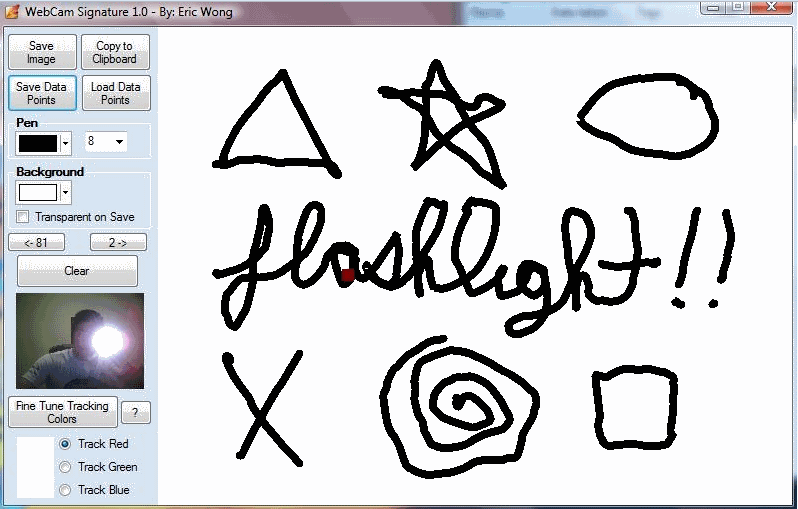
I have run into this situation many times that I need to draw some simple shape in an image, but can’t draw it precisely using my mouse. Professional designers normally have tablets to use pen for drawing instead of mouse. However, I am not a professional designer, so do not want to have this type of high end equipment. I was searching the web today to find some easy way out, and came across this very interesting software called Webcam Signature.
Webcam Signature works in a very interesting way. You need a webcam to use this. Once you install this software, Webcam Signature asks you to specify the color of your pen that Webcam Signature will track. Once you have done that, Webcam Signature gets to work. If you want to draw anything, just start your webcam, start Webcam Signature, and then draw with your pen in front of webcam. Webcam Signature will capture the movement of your pen precisely, and draw that shape in its built-in editor. You can see as your image is being drawn. This is much easier as compared to trying that same image by mouse.
Webcam Signature also lets you use this feature to use your pen as your mouse. By moving your pen in front of your webcam, and Webcam Signature will move your mouse pointer accordingly. However, this does not have a feature to provide click funtionality of mouse, so this feature might not be very useful right now.
Webcam Signature is really good for some casual drawing, and even just for fun. It is totally free, and definitely a very interesting idea.

Webcam Signature is a free software that lets you do simple drawing on your computer using just your pen and webcam. As you draw with your pen in front of your webcam, Webcam Signature will capture the movements of your pen, and will draw that shape in your computer. This software is completely free, and very easy to use.

Download WebCam Signature Free
Sponsored Links

I have run into this situation many times that I need to draw some simple shape in an image, but can’t draw it precisely using my mouse. Professional designers normally have tablets to use pen for drawing instead of mouse. However, I am not a professional designer, so do not want to have this type of high end equipment. I was searching the web today to find some easy way out, and came across this very interesting software called Webcam Signature.

Webcam Signature works in a very interesting way.You need a webcam to use this. Webcam Signature tracks the movement of your pen using your webcam. Once you install this software, Webcam Signature asks you to specify the color of your pen that Webcam Signature will track. Once you have done that, Webcam Signature gets to work. If you want to draw anything, just start your webcam, start Webcam Signature, and then draw with your pen in front of webcam. Webcam Signature will capture the movement of your pen precisely, and draw that shape in its built-in editor. You can see as your image is being drawn. This is much easier as compared to trying that same image by mouse.

Webcam Signature also lets you use this feature to use your pen as your mouse. By moving your pen in front of your webcam, and Webcam Signature will move your mouse pointer accordingly. However, this does not have a feature to provide click funtionality of mouse, so this feature might not be very useful right now.

Webcam Signature is really good for some casual drawing, and even just for fun. It is totally free, and definitely a very interesting idea.

Home Page: Click Here
Works With: Windows
Free / Paid: Free

Link to This Page:


No related posts.

Be the first to know about Latest Free Software:

  • Join us on Facebook
  • Subscribe to our RSS Feed
  • Follow us on Twitter
  • Subscribe to Email Updates:

Posted in Image & Photo, Windows | Tagged draw with pen, replacement for tablet, track pen movement, track pen movement with webcam, webcam, webcam signature | 3 Responses

Ishan Bansal

  • donald z. gould

    Good Morning just figured i will let you know that i had a problem with this blog appearing frozen as well. Must be monkeys in the page.

  • Pingback: Vitamin D: Monitor Your Home or Office using Webcam Free | I Love Free Software

  • daro

    i want to know how to draw because i do not know how to draw and it is hard to draw a animal or little ones.

« Previous Next »

Featured Posts

  • 5 Apps For Windows 8 To Record Sound
  • Top 7 Free Launchers for Android
  • 5 Free Snippet Managers To Manage Code Snippets
  • 5 Free Online Tools To Test Website In Different Resolutions
  • 5 Free Microsoft Access Alternatives
  • 5 Free IP Notifier Apps
  • 5 Online Mapping Websites
  • 5 Free Alternatives To iGoogle

Join More than 15,000 Followers!

Enter your Email Address
  • Submit Software
  • Software Testing Service
  • Write For Us
  • About Us
  • Privacy Policy
  • Disclosure
  • Contact Us

Link to Us:

Did we review your software here? Feel free to flaunt this badge on your website:

Free Software

Use this Code:

Copyright © 2013 I Love Free Software.

Powered by WordPress and Hybrid. New - H