• Home
  • Software Testing Service
  • About US
    • Privacy Policy
    • Disclosure
  • Write For Us
  • Submit Software
  • Contact Us
    • Subscribe
I Love Free Software
Best free software available all over the web. The free software categories include Windows Software, Social Networking Tools, and software installation videos.


  • Featured
  • Windows
  • Web Applications
  • App Store
  • Android
  • iPhone
  • iPad
  • Windows 8
  • Social Networking
  • Programming Tools

CloudDrive: Free Application to Store Documents in Acrobat.com

By Anvin on April 26, 2010 | Sponsored Links

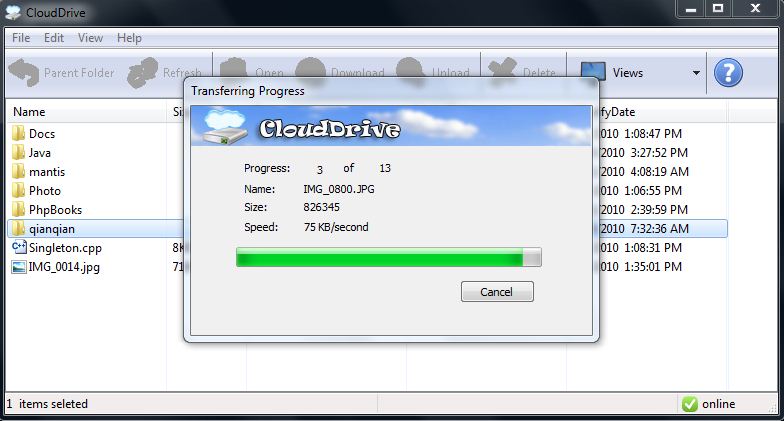
CloudDrive is a free application for Adobe Acrobat Online Storage Service. It provides you with a Free online storage of 5GB. It lets you upload and download any files and folders without opening the Acrobat website. In order to make use of it, all you need to do is sign up for an account on Acrobat.com.

Sponsored Links

Using CloudDrive

CloudDrive can then be used for storing your files and folders for the account that you create on Acrobat.com. As of now, CloudDrive only provides you storage space for uploading and downloading files and folders for Acrobat. Very soon, you will be able to use CloudDrive for other services like Google Docs and SkyDrive.

When you launch the CloudDrive application, it will prompt you to enter your email address and password that you used for registering at online services of Adobe Acrobat such as Acrobat.com, Adobe ConnectNow and Adobe CS Live. Once you enter the login details on CloudDrive, you will be able to upload and download files to the online storage. If any doubts, you can visit the FAQs page on the website of CloudDrive.

Features of CloudDrive:

  1. It is a free online storage for online suite of Adobe Acrobat.
  2. It is totally safe to store your files on the 5GB online storage space.
  3. Even when you close the application, the system remains in the system tray and works in the background.
  4. You can access the files and folders that you have stored online from any location.
  5. You can upload files on CloudDrive through three ways: drag and drop, copy and paste and also through the upload button. You can download files by hitting the download button on the app

If you need more online free storage, you can try GoAruna, or ADrive.

Home Page: Click Here
Works With: Windows 7, Windows Vista, Windows XP
Free / Paid: Free

Link to This Page:


No related posts.

Be the first to know about Latest Free Software:

  • Join us on Facebook
  • Subscribe to our RSS Feed
  • Follow us on Twitter
  • Subscribe to Email Updates:

Posted in Online Storage, Web Applications, Windows | Tagged 5GB online storage, free online storage, online storage space | Leave a response

Anvin

« Previous Next »

Featured Posts

  • 5 Apps For Windows 8 To Record Sound
  • Top 7 Free Launchers for Android
  • 5 Free Snippet Managers To Manage Code Snippets
  • 5 Free Online Tools To Test Website In Different Resolutions
  • 5 Free Microsoft Access Alternatives
  • 5 Free IP Notifier Apps
  • 5 Online Mapping Websites
  • 5 Free Alternatives To iGoogle

Join More than 15,000 Followers!

Enter your Email Address
  • Submit Software
  • Software Testing Service
  • Write For Us
  • About Us
  • Privacy Policy
  • Disclosure
  • Contact Us

Link to Us:

Did we review your software here? Feel free to flaunt this badge on your website:

Free Software

Use this Code:

Copyright © 2013 I Love Free Software.

Powered by WordPress and Hybrid. New - H