• Home
  • Software Testing Service
  • About US
    • Privacy Policy
    • Disclosure
  • Write For Us
  • Submit Software
  • Contact Us
    • Subscribe
I Love Free Software
Best free software available all over the web. The free software categories include Windows Software, Social Networking Tools, and software installation videos.


  • Featured
  • Windows
  • Web Applications
  • App Store
  • Android
  • iPhone
  • iPad
  • Windows 8
  • Social Networking
  • Programming Tools

Free Android Photo Editor App: Photo Warp

By Lalit Aggarwal on October 26, 2011 | Sponsored Links

Photo Warp is a free Android photo editor App to give a panoramic effect to an image on your Android phone. You just need to click an image, warp the image with the app and then bend the image for original result. Make yourself a unique Android photo editor by editing photos. You can give the effects to a photo like make yourself skinnier, enlarge any body part if required, buff up yourself. You can also make your friend’s photo look fatter by putting several pounds of extra fat on his/her body. Just go crazy, warp your photos and you too can be an instant, super-cheap plastic surgeon.

PhotoWarp2
Sponsored Links

Lets take a look at some of the funny creativity that this free Android photo editor App, Photo Warp app can perform:
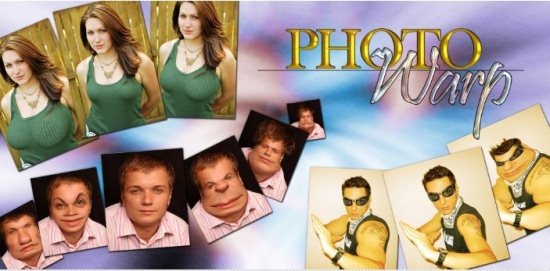
Photowarp

iPhone, iPad users can check other photo editing app for iPhone, iPad reviewed by us.

Some Key Features Of free Android Photo Editor App, Photo Warp:

  • You can move the pixels of an image around by moving the cursor from the app.
  • The pinch and bloat tools in the app moves pixels of image toward or away from the center of the brush.
  • This app allows you to save images to SD card after giving it different effects.
  • This app also allows itself to install in SD card.
  • It is really a very fast app and gives an instant response for the commands provided to the app.
  • You can even adjust the brush size, its hardness and give the different effects to an image.
  • Provides the option to convert the image to its original stage as it was earlier.

How To Install Photo Warp, Photo Editor App:

  • Just login to “Android Market”
  • Click on “Search” Tab. Type “Photo Warp” in search tab.
  • Click on “Photo Warp”.
  • Click on “Install”.

The Free Photo Warp, Photo Editor App will be automatically installed. Download Free Android Photo Editor App. Just go crazy with yours and your friends photos and make them realize that how hilarious they look after some changes. Feel the difference and enjoy the change.

Home Page: Click Here
Works With: Android 1.6 or later
Free / Paid: Free

Link to This Page:


You Might Also Like:

  1. Free Android Photo Editor Ultimate App
  2. Free Android Photo Editor App: FX
  3. Camera App with Photo Effects For Android
  4. Color Touch Effects: Android Photo Editor App
  5. Android Photo Editor App: Color Splash FX

Be the first to know about Latest Free Software:

  • Join us on Facebook
  • Subscribe to our RSS Feed
  • Follow us on Twitter
  • Subscribe to Email Updates:

Posted in Android | Tagged android, free photo editing, free photo editor, panoramic image, photo editor | 1 Response

Lalit Aggarwal

  • http://www.droidappoftheday.com brad

    great app – it featured on http://www.droidappoftheday.com/2011/11/photo-warp.html

« Previous Next »

Featured Posts

  • 5 Free Snippet Managers To Manage Code Snippets
  • 5 Free Online Tools To Test Website In Different Resolutions
  • 5 Free Microsoft Access Alternatives
  • 5 Free IP Notifier Apps
  • 5 Online Mapping Websites
  • 5 Free Alternatives To iGoogle
  • 7 Websites To Download Windows 8 Themes
  • 5 Best Free Calculator Apps For Windows 8

Join More than 15,000 Followers!

Enter your Email Address
  • Submit Software
  • Software Testing Service
  • Write For Us
  • About Us
  • Privacy Policy
  • Disclosure
  • Contact Us

Link to Us:

Did we review your software here? Feel free to flaunt this badge on your website:

Free Software

Use this Code:

Copyright © 2013 I Love Free Software.

Powered by WordPress and Hybrid. New - H