SM Recorder is a free handy screen recording software that is designed to make it easy to create your own screencasts.With this simple to use screen recording tool you can choose to record whole desktop, or just a selected portion of screen. The application allows you record desktop videos and audios easily, without any fuss. SMRecorder records all its video and audio in the AVI format – one of the most popular. You are also able to create your own audio from a device such as a microphone and videos from a webcam.
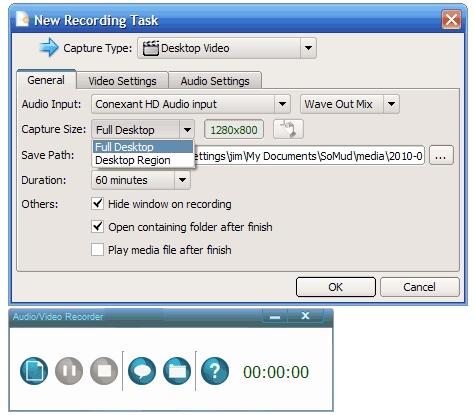
This free desktop recording software has a main interface that is loaded with options that allow you to create various professional screencasts. The main interface is also extremely easy to navigate and understand; you’ll not be confused as the various instructions are written clearly and concisely. Positioned on the left side of the interface is the ‘Record’ button, along with the ‘stop’ and ‘Pause’ buttons. At the bottom right is the ‘Folder’ button; where all recorded files are stored and readily accessed.
How To Record Screen with SMRecorder:
Using SMRecorder is, as mentioned, quite simple. First, simply click on the record button. Once you have clicked on ‘record’ a second interface will open in which you need to enter the configuration options and details. Select which ‘capture’ type you want from the list provided – types include: desktop microphone sound, record desktop video, camera recording, etc. You should then select other parameters – these other parameters include the bit rate of the recording, audio mixing settings and the settings for the custom area or areas, of the desktop. At any time during the recording process, you may paused the recording by simply opening SM Recorder from the system tray. Clicking on the ‘start’ button instantly records the present session in the aforementioned AVI format.
After you have finished recording, you have the option of watching a play-back. To watch your recording, open the SMRecorder folder, which is situated in ‘My Documents’; click on the play-back option and your recording will begin to run. It is clear that this simple-to-use screen-cast capturing software, is a very useful tool to have for professionals and amateurs alike. Capturing screen-cast is becoming a popular method of teaching computer skills recently and SM Recorder has been designed to make creating and viewing screen-shots fun and interesting.
Also check out other free screen recorders, like, CamStudio Free, Webinaria, and AutoScreenRecorder.
SMRecorder is a free application that runs on all Windows operating systems – from Windows 2000 through to the most recent – Windows 7.
Download SMRecorder Free. [via]
