• Home
  • Software Testing Service
  • About US
    • Privacy Policy
    • Disclosure
  • Write For Us
  • Submit Software
  • Contact Us
    • Subscribe
I Love Free Software
Best free software available all over the web. The free software categories include Windows Software, Social Networking Tools, and software installation videos.


  • Featured
  • Windows
  • Web Applications
  • App Store
  • Android
  • iPhone
  • iPad
  • Windows 8
  • Social Networking
  • Programming Tools

Get Classic Menu in Excel 2007 and Excel 2010: Exshail Classic Menu

By Ishan Bansal on November 25, 2011 | Sponsored Links

Exshail Classic Menu is a free software to get the old classic menu of Excel 2000 in Excel 2007 and Excel 2010. You can install this free excel menu software if you don’t like the new ribbon interface of Excel 2007 and Excel 2010. The best part is that it does not removes the ribbon interface; so that also stays. It provides additional option to get classic menu of Excel any time, right over the Ribbon menu.

When you install Classic Menu for Excel, it starts showing up as another tab in Ribbon menu. When you click on that, it shows the complete classic menu. So, to access Classic menu in Excel 2010, you just need to click on the tab for “Exshail menu”.
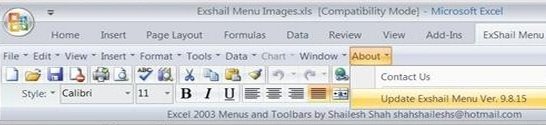
Exshail Menu
Sponsored Links

To use Exshail Menu, just download it from Exshail website. It will download a zip file. Just unzip the file, and run the setup. This will install the Classic menu in Excel 2007 and Excel 2010.

Another similar menu we reviewed earlier are UbitMenu, and Classic Menu Office 2010.

The limitation of this menu is that it works with Excel only, and not with other components of Office 2007, and Office 2010.

Here are some of the features of Classic Menu for Excel:

  • Add classic menu to Excel 2007, and Excel 2010
  • Adds formatting toolbar to Excel
  • Add Standard toolbar to Excel
  • Add worksheet menubar.
  • To uninstall, just use Add / Remove programs option in Control Panel.

Download Exshail Classic Menu, and get easy access to Classic Menu in Excel 2007 and Excel 2010

Home Page: Click Here
Works With: Windows
Free / Paid: Free

Link to This Page:


You Might Also Like:

  1. Classic Menu for Office 2010: UBitMenu
  2. Classic Menu for Office 2010: Add Office 2003/XP Style Menu to Office 2010
  3. Download MSN MoneyCentral Stock Quotes Add-In for Excel
  4. Change Windows 7 Theme to Classic Look: Classic Shell
  5. Microsoft Excel Tutorials App: Learn Excel On Android

Be the first to know about Latest Free Software:

  • Join us on Facebook
  • Subscribe to our RSS Feed
  • Follow us on Twitter
  • Subscribe to Email Updates:

Posted in Windows | Tagged excel | Leave a response

Ishan Bansal

« Previous Next »

Featured Posts

  • 5 Free Snippet Managers To Manage Code Snippets
  • 5 Free Online Tools To Test Website In Different Resolutions
  • 5 Free Microsoft Access Alternatives
  • 5 Free IP Notifier Apps
  • 5 Online Mapping Websites
  • 5 Free Alternatives To iGoogle
  • 7 Websites To Download Windows 8 Themes
  • 5 Best Free Calculator Apps For Windows 8

Join More than 15,000 Followers!

Enter your Email Address
  • Submit Software
  • Software Testing Service
  • Write For Us
  • About Us
  • Privacy Policy
  • Disclosure
  • Contact Us

Link to Us:

Did we review your software here? Feel free to flaunt this badge on your website:

Free Software

Use this Code:

Copyright © 2013 I Love Free Software.

Powered by WordPress and Hybrid. New - H