PDFescape is a free website to edit PDF files online. It works with most of the commonly used browsers, like: Internet Explorer, Firefox, Safari, Chrome, Opera.
This online PDF Editor is loaded with some amazing features, where you can edit the PDF files existing on your local system, add link of online PDF file, or start creating a new file on blank page. The options to add text, images, shapes, links, whiteouts, checkmark, etc. on the PDF file make it a very a very useful PDF form filler as well. Not just editing, PDFescape also gives you the option to save, download, and print the PDF file.
What’s more? You can create a free account with PDFescape, and store up to 10 MB of PDF files online, so that you can access them later from another system.
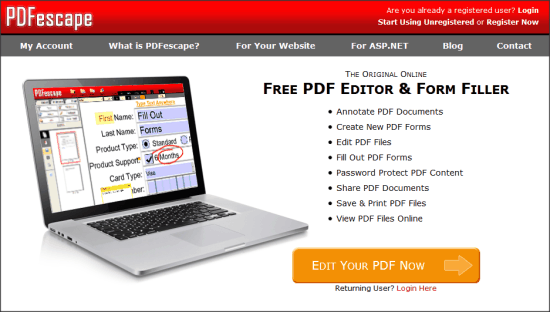
Features of PDFescape:
- Use PDFescape as an online PDF reader, editor, form filler, etc.
- Gives the tools to add text, link, images, shapes, etc. with the option to highlight or add sticky notes anywhere in the file.
- You can provide the link of file to work on it without downloading.
- You can control the permissions of the visibility, and share the link with other users.
- It also gives you the options to rotate, and arrange the sequence of the pages in the document as well.
Limitations With PDFescape:
The online application has some limitations with the free services:
- You can store up to 10 PDF files which can have maximum 10 MB space in total.
- You can’t have more than 100 pages in one file.
- An inactive file will be stored only for 7 days. So, you can either keep updating the file regularly, or you may download the file.
Personally, I don’t find these drawbacks very concerning, and for the kind of services it gives, I’d recommend using PDFescape at least once.
How to Edit PDF Files Online with PDFescape?
You can use the link available at the end of this review to reach the homepage of PDFescape. You can simply click on “Edit your PDF Now” to start editing PDF file. But if you want to keep your PDF files to be stored on PDFescape, then you need to register with PDFescape. To register, click on “Register Now” option. Then you need to provide some of your basic details to create the account.
After creating the account, you can click on “Edit PDF Files” option to start editing PDF online. Here, you need to choose from four options:
- Create New PDF document
- Upload PDF to PDFescape
- Load PDF from Internet
- Load PDF previously opened
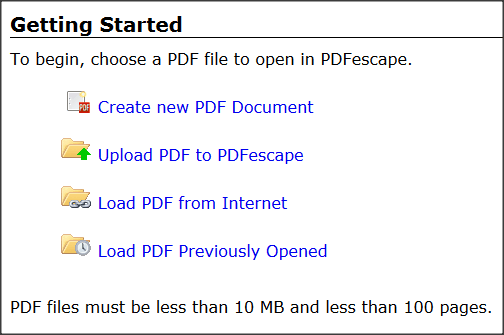
Lets say you choose to upload a PDF file. Now, browse the PDF file from the local directory, and upload it. Now, your PDF file will open in the center of the interface. On the top of it, you get the zoom controllers, and the rest of the editing tools on the left.
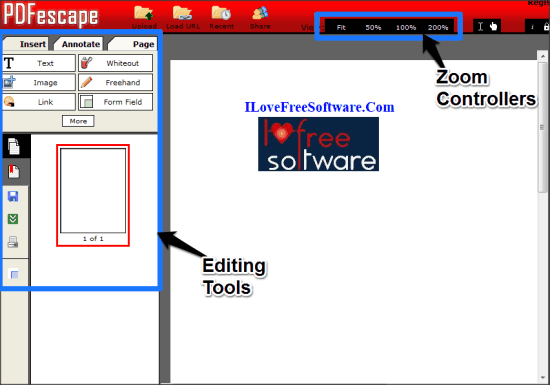
Inserting Items in PDF file:
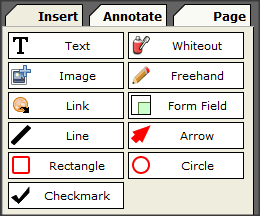
From Insert sections, you can choose the item to be inserted, and then click on the PDF file to insert. For example, to insert text, click on “Text” icon, and then click on the PDF file where you want to add it. Then type the text, and it will be inserted. Similarly, you can add images, shapes, links, form fields, etc.
So, you can easily fill up and create PDF forms with PDFescape.
Other Options with PDFescape:
- You can move to “Annotate” section to add sticky notes, or highlighter.
- “Page” section gives you the option to move the page in the document, select the rotation and cropping of the pages, etc.
- Save, Download, and Print options have their usual operations.
- You can set a document as “Shared”, and share its link with other users with read-only permissions.
My Opinion on PDFescape:
PDFescape lacks the advance options such as merging, splitting, encryption, etc. that are available with other tools like: Sejda and PDFRider. Its strength is its simplicity. You can easily create or edit PDF files online with it. I liked it more for the PDF form filling utility. Options to store the files online, and sharing them with other users makes it even better.
