Linkman Lite is a free bookmark management tool for Windows that is used for organizing and storing bookmarks. Linkman Lite lets you search through bookmarks, automatically fetch keywords and descriptions for bookmarks for each searching, and easy organization of bookmarks. Linkman Lite is an extremely efficient bookmark manager, and frankly, this is how all the browsers should have designed their bookmark system.
This free bookmarks manager has many different features such as retrieving URL’s as well as storing them. It offers synchronization support so that many different computers can be utilized to share links [in paid version]. The browsers native URL management systems are replaced so that you can find what you are looking for quickly.
But this is not all that Linkman Lite does. This free bookmark manager also allows for support in 15 different languages, can handle large databases with ease, offers synchronization and can detect duplicate links. If you have a lot of different bookmarks, then this may be the right software for you to use. You can also try other free bookmarks manager, and pdf bookmarker.
The following screenshot demonstrates very well different features of Linkman Lite:
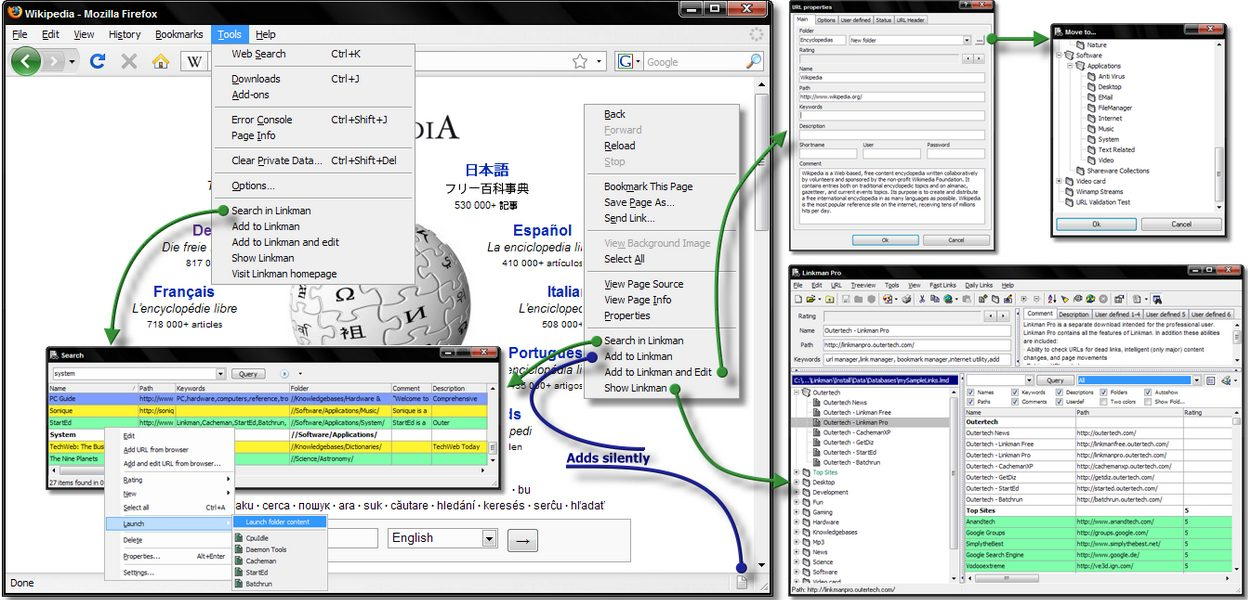
It is hard trying to find bookmarks when you have a large database of bookmarks. This makes it very easy for you. This program also supports user defined data including descriptions, keywords and comments. There is an extensive Help file with this particular program.
Installing this free bookmarks manager is easy. Simply click on the download link and wait for it to download to your computer. Then after the download is done, simply double-click on the icon to install. Once installation is done, then double click the program icon to continue. This program is compatible with Windows 2000, XP Vista and 7. Once installed, Linkman Lite works well to keep all of your links and bookmarks organized. It also has a full drag and drop features as well as having a URL launch history. Linkman Lite is simply a great program for those who have a lot of bookmarks to deal with.
Some of the features of Linkman Lite:
- Multiple Browsers Supported
- Drag and Drop Support
- Language Support in 15 Languages
- User Defined Rating System
- Supports User Defined Data
- Handles Large Databases With Ease
- Optional Toolbars
- Password Protection
- Extensive Help File
- URL Associated Path Launch
- Auto Save
- And so much more
