• Home
  • Software Testing Service
  • About US
    • Privacy Policy
    • Disclosure
  • Write For Us
  • Submit Software
  • Contact Us
    • Subscribe
I Love Free Software
Best free software available all over the web. The free software categories include Windows Software, Social Networking Tools, and software installation videos.


  • Featured
  • Windows
  • Web Applications
  • App Store
  • Android
  • iPhone
  • iPad
  • Windows 8
  • Social Networking
  • Programming Tools

Quick Media Converter Converts Video Files to Any Format

By Ishan Bansal on October 22, 2009 | Sponsored Links

I have reviewed lot of audio and video conversion software earlier, but all of them have some shortcomings and are limited to some specific format. Also, most of the time they are not quite easy to use. Quick Media Converter makes all that a thing of past. It is one of the most easy to use Media Converters that I have ever came across. However, what most impressed me about Quick Media Converter is that it can convert almost any audio and video format to any other audio and video format.
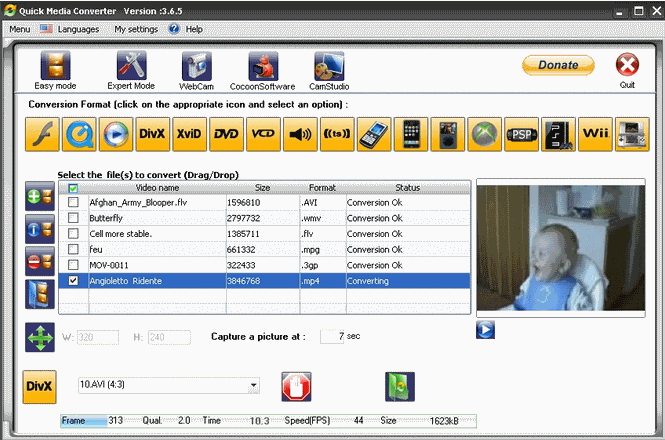
Quick Media Converter is a completely free to use audio and video converter. It comes with a very intuitive and easy to use interface. To convert an audio or video file, you select the file in Quick Media Converter. Then, you select the format that you want to convert to. That’s it. Quick Media Converter would convert your selected file to your selected format. It’s that easy.
Here are the different formats that Quick Media Converter supports:
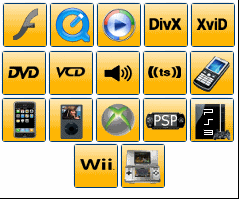
Video Conversion Formats: VCD DVD AVI DIVX FLASH FLV Quick Time Windows Media WMV Xvid TS MPEG Zune MKV OGG MP4 H264
Audio Conversion Formats supported: WAV MP3 WMA  AMR M4A OGG
Ipod & Iphone Conversion formats supported: MP4 MOV H264
Video Game Consoles Conversion Formats supported:
Sony: PS3 and PSP,
Microsoft : XBOX, XBOX 360
Nintendo :  WII & Nintendo DS
Mobile Phones and GSM Video Formats Supported: 3G2 3GP MP4
As you would see from above, Quick Media Converter supports almost every popular audio and video format, and you can convert these easily.
Here are some interesting features of Quick Media Converter:
Drag and Drop Interface
Quick Media Converter comes with an easy to use Drag and Drop interface. Just drag and drop the files that you want to convert in Quick Media Converter’s window, and then just click on the format that you want to convert it to.
Batch Audio and Video Conversion
Quick Media Converter supports batch conversion of your audio and video files. Just drag and drop all the files that you want to convert, and Quick Media Converter will easily do a batch conversion of those to your selected format.
Extract Audio Files from Video Files
Quick Media Converter lets you easily extract audio files from your video files. You can then convert them to any format that you want.
Built-in Media Player

Quick Media Converter comes with a built-in media player that you can use to play all your audio and video files. The player is located just on right side of the screen, and you can just select any file to see a quick preview of that on this player.
Record and Convert your Webcam Video
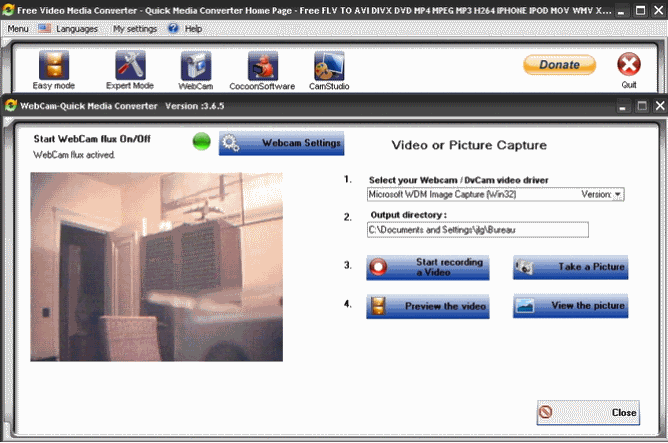
Quick Media Converter comes with a built-in software to capture your webcam videos. You can use that to quickly record videos using your webcam, and then you can convert them to any supported format of your choice. This is pretty good.
Record your Screen using CamStudio
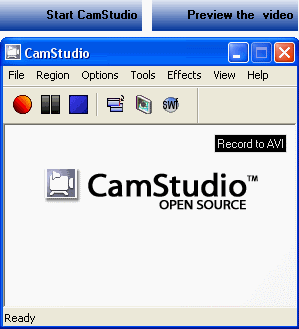
I had earlier reviewed CamStudio as free and open source replacement for Camtasio studio to record your screen. Quick Media Converter comes with built-in CamStudio. This enables you to easily record your screen, save it, and then convert your screen recording using Quick Media Converter. Quick Media Converter makes the whole process so easy by integrating everything together.
Expert Mode
Quick Media Converter also comes with an expert mode that lets you customize your conversion settings. You can specify Codec, Size, frame rate, bitrates, audio codec, mono,  stereo, Frequency Rate, aspect ratio, and a few more. You can even add some additional information to your file, such as Author Name, Title, Copyrights, and Album name.
Quick Media Converter is really feature packed, and extremely easy to use. It is definitely one stop shop for all audio and video conversion needs. I wish it had some sort of functionality to download online streaming files as well (like RealPlayer), and then directly convert them. I seem to be getting more demanding :)

I have reviewed lot of audio and video conversion software earlier, but all of them have some shortcomings and are limited to some specific format. Also, most of the time they are not quite easy to use. Quick Media Converter makes all that a thing of past. It is one of the most easy to use Media Converters that I have ever came across. However, what most impressed me about Quick Media Converter is that it can convert almost any audio and video format to any other audio and video format.

Download Quick Media Converter Free
Sponsored Links

Quick Media Converter is a completely free to use audio and video converter. It comes with a very intuitive and easy to use interface. To convert an audio or video file, you select the file in Quick Media Converter. Then, you select the format that you want to convert to. That’s it. Quick Media Converter would convert your selected file to your selected format. It’s that easy.

Here are the different formats that Quick Media Converter supports:

Quick Media Converter Supported Formats

Video Conversion Formats: VCD DVD AVI DIVX FLASH FLV Quick Time Windows Media WMV Xvid TS MPEG Zune MKV OGG MP4 H264

Audio Conversion Formats supported: WAV MP3 WMA  AMR M4A OGG

Ipod & Iphone Conversion formats supported: MP4 MOV H264

Video Game Consoles Conversion Formats supported:

  • Sony: PS3 and PSP,
  • Microsoft: XBOX, XBOX 360
  • Nintendo: WII & Nintendo DS
  • Mobile Phones and GSM Video Formats Supported: 3G2 3GP MP4

As you would see from above, Quick Media Converter supports almost every popular audio and video format, and you can convert these easily.

You can use one of these free software to download YouTube videos, and then use Quick Media Converter to convert downloaded Youtube videos to your iPod, iPhone, PSP, or XBOX format.

Here are some interesting features of Quick Media Converter:

Drag and Drop Interface

Quick Media Converter comes with an easy to use Drag and Drop interface. Just drag and drop the files that you want to convert in Quick Media Converter’s window, and then just click on the format that you want to convert it to.

Batch Audio and Video Conversion

Quick Media Converter supports batch conversion of your audio and video files. Just drag and drop all the files that you want to convert, and Quick Media Converter will easily do a batch conversion of those to your selected format.

Extract Audio Files from Video Files

Quick Media Converter lets you easily extract audio files from your video files. You can then convert them to any format that you want.

Built-in Media Player

Quick Media Converter Player

Quick Media Converter comes with a built-in media player that you can use to play all your audio and video files. The player is located just on right side of the screen, and you can just select any file to see a quick preview of that on this player.

Record and Convert your Webcam Video

Record Webcam with Quick Media Converter

Quick Media Converter comes with a built-in software to capture your webcam videos. You can use that to quickly record videos using your webcam, and then you can convert them to any supported format of your choice. This is pretty good.

Record your Screen using CamStudio

Record Screen with Quick Media Converter

I had earlier reviewed CamStudio as free and open source replacement for Camtasio studio to record your screen. Quick Media Converter comes with built-in CamStudio. This enables you to easily record your screen, save it, and then convert your screen recording using Quick Media Converter. Quick Media Converter makes the whole process so easy by integrating everything together.

Expert Mode

Quick Media Converter also comes with an expert mode that lets you customize your conversion settings. You can specify Codec, Size, frame rate, bitrates, audio codec, mono,  stereo, Frequency Rate, aspect ratio, and a few more. You can even add some additional information to your file, such as Author Name, Title, Copyrights, and Album name.

Quick Media Converter is really feature packed, and extremely easy to use. It is definitely one stop shop for all audio and video conversion needs. I wish it had some sort of functionality to download online streaming files as well (like RealPlayer SP), and then directly convert them. I seem to be getting more demanding.

Home Page: Click Here
Works With: Windows
Free / Paid: Free

Link to This Page:


You Might Also Like:

  1. Free E-Z Media Converter: Convert All Types of Audio And Video files
  2. Free HD Video Converter: Convert Video Files to HD Format
  3. All-In-One Video Converter: Green Free Video Converter
  4. Format Factory: Free Audio, Video, Image Converter
  5. Media Converter: Free Online Audio-Video Converter

Be the first to know about Latest Free Software:

  • Join us on Facebook
  • Subscribe to our RSS Feed
  • Follow us on Twitter
  • Subscribe to Email Updates:

Posted in Audio Video Converters, MP3 & Audio Software, Video Software, Windows | Tagged audio converter, convert video for ipod, convert video for PSP, convert video for Wii, convert video for XBOX, convert video to DVD free, download Quick Media Converter, free video converter, quick media converter | Leave a response

Ishan Bansal

« Previous Next »

Featured Posts

  • Top 7 Free Launchers for Android
  • 5 Free Snippet Managers To Manage Code Snippets
  • 5 Free Online Tools To Test Website In Different Resolutions
  • 5 Free Microsoft Access Alternatives
  • 5 Free IP Notifier Apps
  • 5 Online Mapping Websites
  • 5 Free Alternatives To iGoogle
  • 7 Websites To Download Windows 8 Themes

Join More than 15,000 Followers!

Enter your Email Address
  • Submit Software
  • Software Testing Service
  • Write For Us
  • About Us
  • Privacy Policy
  • Disclosure
  • Contact Us

Link to Us:

Did we review your software here? Feel free to flaunt this badge on your website:

Free Software

Use this Code:

Copyright © 2013 I Love Free Software.

Powered by WordPress and Hybrid. New - H