Transferbigfiles.com is a free, online file transfer application that allows the user to transfer large files effortlessly. The user can transfer files as large as 100MB to anyone in a matter of minutes with free account of TransferBigFiles (paid account allows transfer of up to 2GB file size). Email facilities, most of the times, are not sufficient to transfer large files. Also most of them prevent the transmission of executable files. Transferbigfiles.com provides solution to all these issues.
How to Send Large Files by TransferBigFiles:
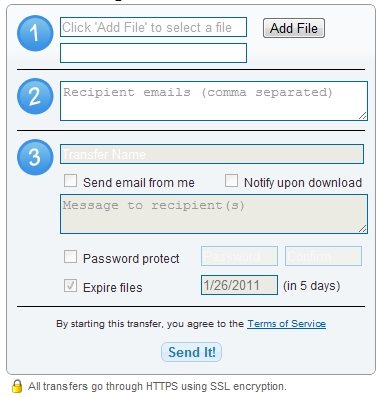
An account is not required by the user in Transferbigfiles in order to use the service. However, creating a free account gives some additional features, like, password protection, and download notification.
Then, the user just has to choose the file and upload it using the service. The site provides unlimited number accesses as far as uploading a file is concerned. Max storage limit for free accounts is 5GB.
The user uploads the files on to the servers maintained by TransferBigfiles. The user also types in the mail-ids of the recipients who he intends to deliver the file to. The application sends back a URL link to the page where the uploaded resource can be accessed by the recipient. The link is sent on the mail as well.
Each large file can be downloaded from the site for as many as 20 times. However the files do expire after five days of their upload. The files are marked for deletion once the files cross the use-by date and they cannot be accessed by the user anymore. This is done to avoid the unnecessary storage and load on the server.
The user can, however, upload the file once again, if he/she wants to have it on the servers for sometime longer. You can also read about Ge.tt another free file sharing service to share large files or Mirrorcreator through which you can upload a file to multiple file sharing sites.
Transferbigfiles.com does its best to avoid spams and preventing unwanted files from being uploaded onto the server. Just a single report of abuse about an abusive link is enough to remove the malicious file from the server. So the user can always trust Transferbigfiles.com to provide a seamless service.
