Fix Picture is a free online image editor and converter where you can upload images, over 400 different formats are supported, including RAW digital camera photos, select either image resize, rotation or effects, and then simply click Convert to receive the download link of the converted and edited image.
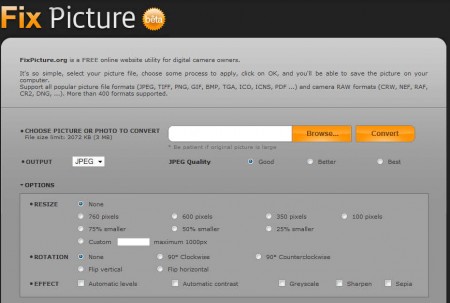
Like we said Fix Picture is not a computer application, it’s a website where users can, in just a few easy steps, convert and make corrections to their images. No registration is necessary, all that you have to do is go through all of the image manipulation options which can be seen on the image above, first of which would be image selection. Note that there is a limitation when it comes to image size, selected images cannot be more than 3MB in size. Some of the features offered by Fix Picture are:
- Good format support (JPEG, PNG, GIF, BMP, TGA, ICO, ICNS, PDF etc)
- RAW formats are also supported (CRW, NEF, RAF, CR2, DNG)
- Select 3 different quality settings – for some formats like JPEG and PNG
- Image resizing – according to templates or custom windows sizes
- Photo rotation – for sideways camera photos
- Image effects – automatic levels, contrast, greyscale, sharpen, sepia
Image that you can see above is where all the magic happens, after you’ve loaded image which needs to be edited or converted, you need to go through all the options down below. Options might be hidden from view, but they can be easily activated by clicking on the Options tab, once you do that, you’ll be able to see what can be seen on the screenshot above.
Similar software: Retouch Pilot Pro, RawTherapee, Funny Photo Maker.
How to edit and convert photos with Fix Picture
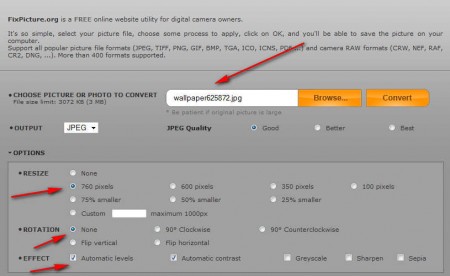
Image above shows us how easy it is to use this free online photo editor. By clicking on Browse we were presented with the standard image selection window where you can select image that you want to manipulate, only one, this is not a batch converter. Under Output, select the desired output format and quality, after which you can move on to the Options tab. There we decided to resize the image, and also to make automatic changes to color levels and contrast. Once we marked all the images edits which we wanted to apply, the only thing that was left to do was to click on the Convert button.
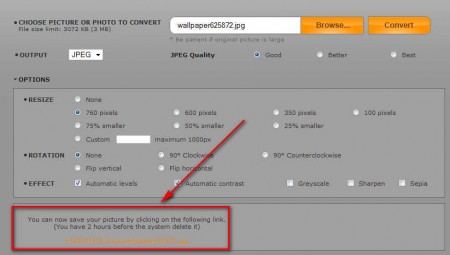
The entire process of uploading and converting images didn’t take long, and upon completion we were presented with the download link further down the screen, below the image editor. Our image was resized, and color corrections were applied just fine.
Conclusion
Sometimes we find ourselves in situations where we don’t have a photo editor installed on the computer that we’re using, but we need to edit photos and that’s exactly the kind of setup where Fix Picture online image editor can come in to save the day. Open the browser, visit the Fix Picture website, upload your image, select the changes that you want to do and then simply leave this free online image editor to do it’s thing. Once everything is done, just click the download link and grab your converted and edited photos.
