• Home
  • Software Testing Service
  • About US
    • Privacy Policy
    • Disclosure
  • Write For Us
  • Submit Software
  • Contact Us
    • Subscribe
I Love Free Software
Best free software available all over the web. The free software categories include Windows Software, Social Networking Tools, and software installation videos.


  • Featured
  • Windows
  • Web Applications
  • App Store
  • Android
  • iPhone
  • iPad
  • Windows 8
  • Social Networking
  • Programming Tools

MouseFIGHTER – Control Mouse Cursor With Keyboard

By Garima on October 21, 2010 | Sponsored Links

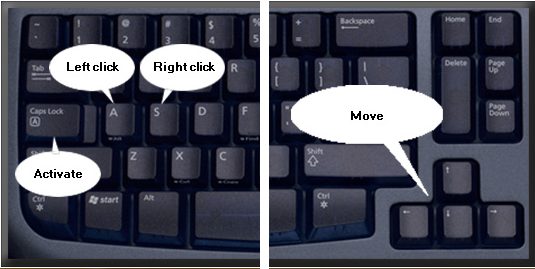
MouseFIGHTER is a free system utility that lets you control mouse cursor with keyboard, providing mouse-free navigation to make computing easier. Instead of using your mouse, use your keyboard with this alternative computer control method.

Using a mouse all the time can be painful for your arms. So use mouse-free navigation and control your screen with the keyboard. Windows has an inbuilt feature called Mousekeys which lets you control your screen with a numeric keypad instead of using a mouse but not every keyboard has a numeric keypad. A laptop or a compact keyboard doesn’t have a numeric keypad to work with.
MouseFIGHTER
Sponsored Links

MouseFIGHTER is a free system utility that gives you complete control over your screen pointer and you can move it the way you want to without making any extra efforts, all with an alternative computer control method.

Other tools to make computing easier include UltraVNC and gMote.

Features of MouseFIGHTER:

  • MouseFIGHTER has a new improved user interface
  • The free system utility is now bug-free
  • You can customize the hot keys for directional control when you use this mouse-free navigation
  • Speed, acceleration and other things can be controlled to make computing easier
  • You have to use the CapsLock key to control your screen with the keyboard
  • This alternative computer control method allows you to make large jumps with the pointer

MouseFIGHTER works quite well as an alternative computer control method. The free system utility lets you relax your body and arm movements to use mouse-free navigation an make computing easier for you.

For another free system utility to present an alternative computer control method, you should look at LogMeIn Free and MobileWitch Bluetooth Remote Control.

Home Page: Click Here
Works With: Windows 7, Windows Vista, Windows XP, Windows 2000, Windows 98
Free / Paid: Free

Link to This Page:


You Might Also Like:

  1. Free Mouse Emulator: Control Mouse Cursor With Keyboard
  2. Use Keyboard As Mouse With Shark Mouse
  3. Control Mouse Cursor Via Keyboard: NeatMouse
  4. KeySurf: Control Mouse with Keyboard
  5. How To Control Mouse Pointer With Keyboard In Windows 8

Be the first to know about Latest Free Software:

  • Join us on Facebook
  • Subscribe to our RSS Feed
  • Follow us on Twitter
  • Subscribe to Email Updates:

Posted in Desktop Enhancement | Tagged free system utility, mouse, mouse gesture, mouse gestures, Screen | Leave a response

Garima

« Previous Next »

Featured Posts

  • Top 7 Free Launchers for Android
  • 5 Free Snippet Managers To Manage Code Snippets
  • 5 Free Online Tools To Test Website In Different Resolutions
  • 5 Free Microsoft Access Alternatives
  • 5 Free IP Notifier Apps
  • 5 Online Mapping Websites
  • 5 Free Alternatives To iGoogle
  • 7 Websites To Download Windows 8 Themes

Join More than 15,000 Followers!

Enter your Email Address
  • Submit Software
  • Software Testing Service
  • Write For Us
  • About Us
  • Privacy Policy
  • Disclosure
  • Contact Us

Link to Us:

Did we review your software here? Feel free to flaunt this badge on your website:

Free Software

Use this Code:

Copyright © 2013 I Love Free Software.

Powered by WordPress and Hybrid. New - H