Ridnacs is a free Windows disk space analyzer which you can use to scan your local drive, network drives and directories. This useful tool then produces a “tree” view with a percentage bar chart column. Now you may be wondering what exactly is the point of having this free analyzer of disk space in your software “toolbox”. I’ll answer you by explaining that if you utilize Ridnacs, you will be able to understand clearly how much space various directories and files are occupying on your computer.
Knowing what directories, sub-directories; files and so forth is very useful for disk cleaning operations. In other words, you are able to clearly view any unnecessary files and directories. Ridnacs will list these “dead-end” directories and files in the tree. This free disk space analyzer allows you to scrutinize your PC’s disk space.
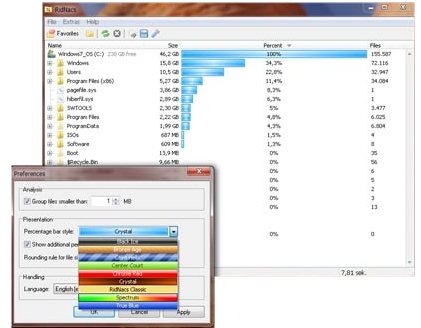
Once you have scanned your system, you are able to export the results to different formats; allowing you to have the options of either printing the results or using the data as a comparison for future scans. These formats include XML, HTML, CSV, TXT.
Ridnacs has an easily navigated interface and consists of a window with commands at the top enabling you to choose which directory you wish to analyze; a blank window displays results following the scan. The scanning performance of this disk space analyzer is outstanding, as it produces an in-depth view of all files in each directory on your PC.
Also check out other disk space analyzers we reviewed earlier, including, Free Disk Usage Analyzer, and OverDisk.
Ridnacs version 2 has the following new functions that have been added to make your analyzing activities much easier, albeit detailed:
- The application will group files that are smaller than a configurable size.
- From within the application, files can be opened or deleted easily.
- Microsoft Explorer context is supported.
- Files with icons are retrieved in the background and thus improve the computer’s performance.
- The design and style of the percentage bar is able to be configured.
- The introduction of a “favorites list” combines drives with recently used directories.
- incomplete scanned directories receive symbol tags.
- A new XL format has been added to the list of other formats.
- The introduction of a performance dialog.
- All network drives are displayed in a “Choose Directory” window.
Ridnacs is a very good tool to have on you computer. It can scan your directories and drives in a few minutes and supply you with data in bar graphs which are represented by percentages, allowing to see how much disk space is actually being used. For those who what to improve their computer’s performance this disk space analyzer, Ridnacs, is a useful application.
Download Ridnacs free.
