• Home
  • Software Testing Service
  • About US
    • Privacy Policy
    • Disclosure
  • Write For Us
  • Submit Software
  • Contact Us
    • Subscribe
I Love Free Software
Best free software available all over the web. The free software categories include Windows Software, Social Networking Tools, and software installation videos.


  • Featured
  • Windows
  • Web Applications
  • App Store
  • Android
  • iPhone
  • iPad
  • Windows 8
  • Social Networking
  • Programming Tools

Convert Access to PostgreSQL

By Ishan Bansal on January 19, 2011 | Sponsored Links

Access to PostgreSQL is a free software to convert Access database to PostgreSQL database. Access to PostgreSQL comes from the makers of Access to MySQL, and Access to MS SQL,  and is equally easy to use. Access to PostgreSQL converter will easy let you create PostgreSQL database from Access database.

How to Convert Access to PostgreSQL:

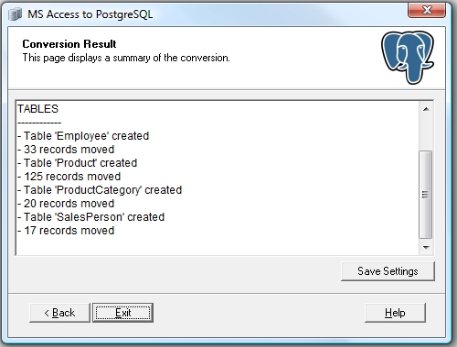
Access to PostgreSQL is extremely easy to use because it comes with a wizard like interface. Here are the steps to convert Access database to PostgreSQL database.
Access to PostgreSQL
Sponsored Links

  1. Download and install the Access to PostgreSQL software. You can download it from here.
  2. Start the Access to PostgreSQL converter. The program will automatically launch in the wizard like interface.
  3. As a first step, specify the path of your Access file that you want to convert to PostgreSQL. If you need to provide login details of Access database, you can do that too in this step.
  4. After that, you need to provide details of the destination PostgreSQL database where your Access database will be transferred. You can provide all the connection details, username and password of target PostgreSQL database.
  5. After that, you can choose which tables of Access database you want to convert to PostgreSQL. You can choose to transfer all the tables, or you can selectively choose the tables that you want.
  6. Then you can provide some additional transfer options, like, transfer indexes, do not transfer data, transfer default value properties, and more.
  7. Once you have done all the settings, just click on “Run Now” button. This will start the conversion process of converting Access to PostgreSQL.

As you see, Access to PostgreSQL converter makes it extremely easy to convert Access database to PostgreSQL database. This could be quite a tricky process, but Access to PostgreSQL takes away all the complexity, and makes the process quite painless.

Home Page: Click Here
Works With: Windows
Free / Paid: Free

Link to This Page:


You Might Also Like:

  1. Convert Access to MS SQL
  2. Convert Access to MySQL
  3. DBeaver: Free Database Manager for Oracle, SQL Server, MySQL, PostgreSQL, DB2
  4. Convert Stock Trasactions to .txf Format: CSV to TXF Converter
  5. Import Data from Excel, Access, MySQL, Oracle, Text Files: FlowHeater

Be the first to know about Latest Free Software:

  • Join us on Facebook
  • Subscribe to our RSS Feed
  • Follow us on Twitter
  • Subscribe to Email Updates:

Posted in Programming Tools | Tagged access to postgresql | Leave a response

Ishan Bansal

« Previous Next »

Featured Posts

  • 5 Free Snippet Managers To Manage Code Snippets
  • 5 Free Online Tools To Test Website In Different Resolutions
  • 5 Free Microsoft Access Alternatives
  • 5 Free IP Notifier Apps
  • 5 Online Mapping Websites
  • 5 Free Alternatives To iGoogle
  • 7 Websites To Download Windows 8 Themes
  • 5 Best Free Calculator Apps For Windows 8

Join More than 15,000 Followers!

Enter your Email Address
  • Submit Software
  • Software Testing Service
  • Write For Us
  • About Us
  • Privacy Policy
  • Disclosure
  • Contact Us

Link to Us:

Did we review your software here? Feel free to flaunt this badge on your website:

Free Software

Use this Code:

Copyright © 2013 I Love Free Software.

Powered by WordPress and Hybrid. New - H