doubleTwist is a free and lightweight multimedia player and a great iTunes alternative which you can use in order to open and listen to your music collection, but not only that, you can also manage and view images and videos. You can use doubleTwist on Windows and Mac, and if you’re by any chance using a smartphone, Android based smartphone, you can install doubleTwist there, just head on to the Google Store and find the app available for free installation.
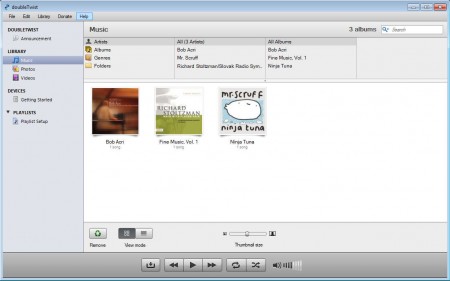
Notice that there are a lot of similarities between doubleTwist and iTunes. Interface design and coloring is the same, even the object arrangement is very similar, but there are some very important differences. Player controls are for example at the bottom, and the left sidebar doesn’t have as much as options like iTunes has. Some of the more interesting features found in doubleTwist would be:
- Good format support, MP3, WMV, FLAC, WAW, they all work just fine
- Cross platform availability – works on Windows, Mac and Android
- iTunes -ike album array with thumbnails is available, see image above
- Video imports and reproduction – both offline and online
- YouTube and Flickr video and photo uploading
- Image and photo collection managing with inbuilt viewer
As you can see, doubleTwist is in a lot of ways an improvement over iTunes, because with it you can not only listen to songs, but you can manage and view a whole selection of different multimedia content, even YouTube videos which are gonna be downloaded before added to your collection, which doubleTwist a YouTube video downloader as well.
Similar software: Danjukebox, Mcool, Boom Player.
How to manage songs, videos and photos with doubleTwist
Well as soon as you open up the program for the first time, all the songs and videos from the My Music and My Videos folders are gonna be loaded automatically and displayed in the doubleTwist library.
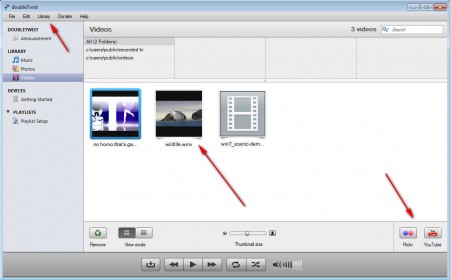
If you want to open up additional files, select Library option at the top and there select either Add File or Add Folder depending what it is that you’re interested in importing. Notice the YouTube icon in the lower right corner of the screen. By clicking there you can start the video upload process for which you’re gonna have to login to your Google Account.
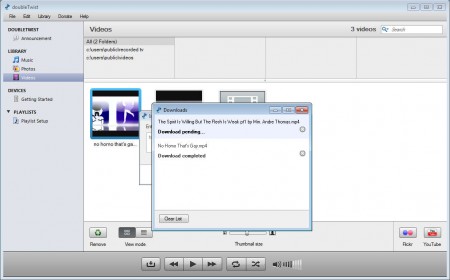
If you want to import online videos you need to click on File and then select Import from Web. A window will pop up where you’ll be able to post YouTube links and after you click import, download should start. Imported videos are gonna be automatically loaded into your doubleTwist video collection.
Conclusion
doubleTwist is a versatile multimedia player which you can use in order to manage and view images, videos and music. All the common formats will work in doubleTwist, so you don’t have to worry about your files not being detected because of format not being supported. iTunes is a very resource demanding application, and if you are interested in an alternative, then doubleTwist is just the thing that you’re looking for, you get even more functionality than what you get in iTunes, try it and see for yourself.
