Zappit is a free system cleaner to remove junk files from your computer that runs a Windows Operating System. Zappit cleans up unnecessary files from your computer hard drive, thereby speeding it up and improving the performance of the system significantly. This free temporary file cleaner comes with a great feature of scheduled system clean up. Using this, you can schedule system cleanup so that temporary files are delete automatically on a regular basis. Also check out other free system cleaner software we reviewed earlier, and free registry cleaners.
Zappit is as small in size as 1.5 MB and the setup is quite easy.
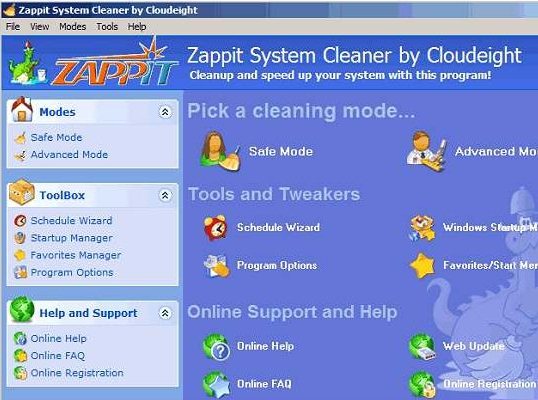
Zappit System Cleaner cleans up the following:
- Program files leftover after using Windows applications like Media Player, Notepad, Paint etc.,
- Browser based files such as URL history, cookies, Auto form Data etc.,
- Windows log files such as Recycle bin, Clipboard data, Temporary data and log files, Search history, Run history etc.,
Zappit system cleaner has a simple ‘safe mode’ option for naive users, who are not familiar with the software usage, and an ‘Advanced Cleanup’ option for the ‘power users’ who need to customize the cleanup operation based on specific needs.
Safe mode cleans up only those files that are ‘Safe to Remove’ like cookies, temp files, recycle bins etc. Advanced mode of cleanup is used to clear files that are of wider range, including Clipboard data, Recent documents list,search history, run history etc.
Zappit is compatible with various versions of Windows such as Windows 98,98 SE, ME, NT ,XP, Vista.
The minimum system requirements for Zappit to run :
- A minimum of 64 MB of RAM for basic versions of Windows operating systems like Win 98,98 SE,ME,NT.
- A minimum of 128 MB, preferably 256 MB of RAM for Windows XP.
- A minimum of 512 MB for Windows vista.
Some of the features of this free system cleaner:
Startup manager: Allows the user to control whether the Zappit application has to run during the Startup of Windows or remain switched off,only to be manually started. This feature makes it easy for the user to control the programs that are to be run during the computer startup. Also check out other startup managers: Soluto, and StartupLite.
Favorites manager: Allows the user to sort the favorite entries,including those on the start menu.Even the sub folders in the start menu can be sorted.
Advantages of Zappit free system cleaner software:
- Sorting of files can be done automatically or manually based on choice of the user.
- Startup manager controls the programs that are run during the startup.
- Removes junk files that clog and choke your system.
- Simple interface and Safe mode cleanup makes it easy for beginners.
- Advanced options and program controls to customize the cleanup for Power users.
- Options to set up Triggers to run the program at a specified time and Scheduling options are also available.
Zappit system cleaner is completely free, and can be downloaded from here.
