Distraction Shield is a free tool which can be used to block Facebook and access to the popular social networking sites and chat services. This tool has a great significance in today’s time in different places whether it’s a school, college or a corporate building. This is because often students or employees can be seen wasting their time on such websites during the working hours. Hence it becomes important to keep a check on their activities. Distraction Shield is here to end your woes and make it easier to make sure that it blocks access to social networking websites and messengers or chat clients.
Activating Distraction shield to block Facebook:
One of the best things about this free tool is that it can be used in any of the three operating systems: Windows (XP/Vista/7), Mac and Linux. The only difference lies in how you would configure it on different machines. Here are a few basic steps which would help you to configure the tool on any of these operating systems. However the basic step for any of these operating systems remains the same. Initially, you have to download the “hosts” file from the website :
Windows
- Copy the downloaded file to the destination folder –” C:\WINDOWS\system32\drivers\etc”.
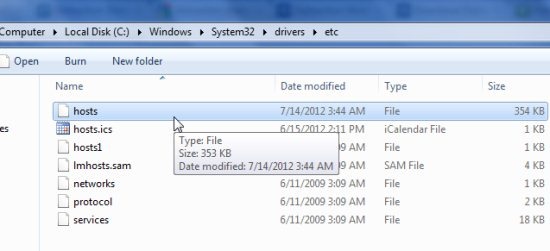
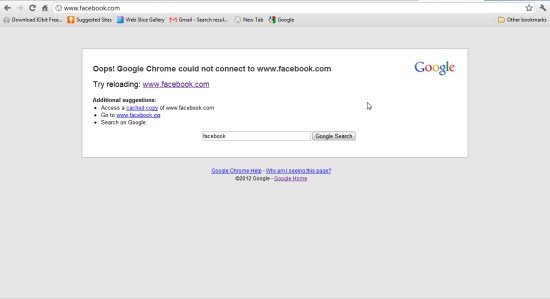
As you can see, we posted the “hosts” file in the destination folder. We tried opening Facebook, but this was what we could see:
Linux
- Open the downloaded file in any text editor. It can be any text editor for linux such as vi editor, nano etc.
- You will come across the line “#Web Addressers that will be blocked”, excluding this line copy the complete content below this line.
- Paste the copied content to the file “/etc/hosts” below the original content.
Mac
For Mac you will have to follow the same instructions as those on a Linux machine. The only difference is that the text editors would be the same and the content has to be copied to the destination “/private/etc/hosts”.
Verdict
Distraction Shield is an interesting tool to block Facebook and other social networking sites; since it can help in increasing the productivity of the people at your workplace. The name itself is sufficient to describe what it does. However, the IRC or the Internet Relay chat networks won’t be blocked. This is because a number of applications such as file sharing, group discussions become possible with such networks. Hence the productivity is increased. Hence Distraction Shield is worth trying if you wish to do it in a small organization rather than paying huge amounts for other software which offer the same services.
Download Distraction Shield for free.
