Here is a short tutorial on how to See Passwords Stored in Firefox. Firefox is one of the most secure web-browsers. It also works like a password manager, thereby letting you store usernames and passwords. One of the most common online service offered by Firefox that you use, is its secure password manager. The basic work of this password manager is to automatically fill out the username and password boxes for websites you visit regularly and have saved passwords for them. This makes your work easier as you don’t have to log in again and again on the websites you visit everyday.
In case you missed out or forgot any of the password for a particular website, you can very easily check log in information like username and stored passwords through Firefox.
To view all the saved password information in Firefox, Here are the following steps:
How to See Passwords Stored in Firefox
- First of all access your Firefox web browser.
- Now, click on the main Firefox menu.
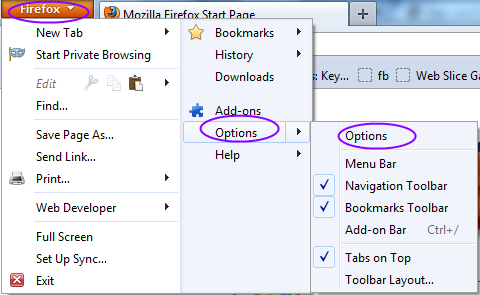
- You will see a menu, just click on “Options” or explore option as shown in picture above.
- On clicking Options a window will open up, just click on the “Security” button listed with a lock icon on top of the window.
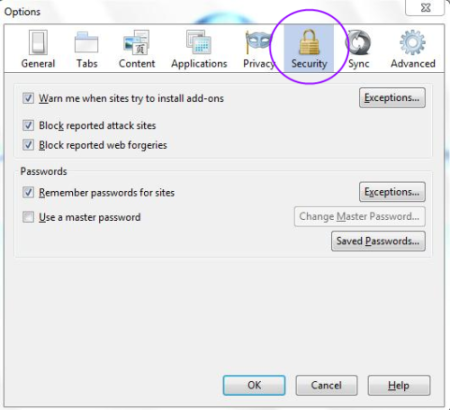
- You see a option for “Saved Passwords”
- The saved password displays each website for which you have already saved the password and username.
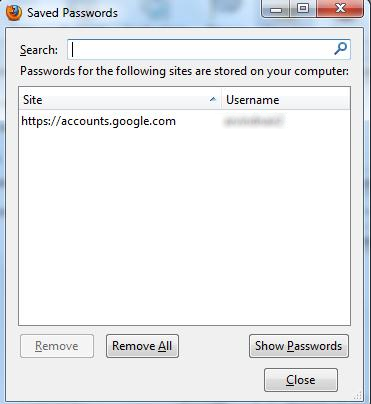
- To view your saved password, you need to click on “Show Passwords”.
- As you click on “Show Passwords” button, a confirmation pop-up window comes up asking you to confirm that you want to see your passwords.
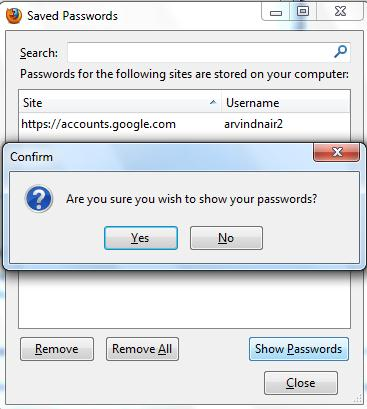
- Click on “Yes” to proceed further.
- You will get to see a password column displayed on your screen, which allows you to see all your stored password.
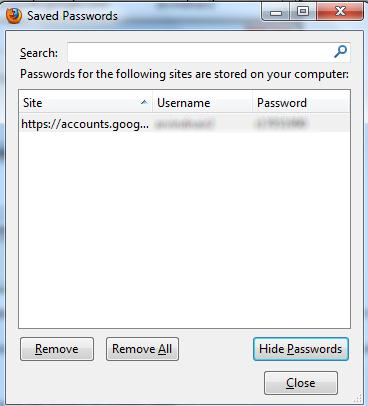
The passwords are shown to you in plain text format, so make sure they are not visible to people around you.
Some of the websites don’t allow you to store the username or password, therefore the password manager won’t be able to work on those websites. This is an independent platform to store all of your usernames and passwords with this Firefox password manager.
