Soft4Boost Disk Cleaner is a free disk cleaning utility which will scan your computer, look for any junk files that might have gathered over time, delete them and leave you with more disk space and a faster computer system. Buildup of unnecessary files can cause a lot of problems, in extreme cases it might even cost you money, so it’s very important to delete junk files, with Soft4Boost Disk Cleaner you can do exactly that, completely free.
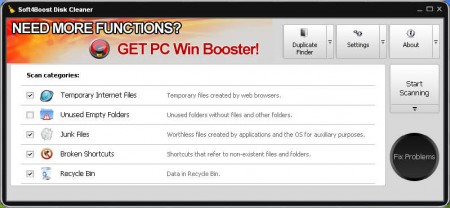
As you can see from the image above, Soft4Boost Disk Cleaner can clean a lot of different system areas where unwanted files have a habit of piling up:
- Temporary Internet Files
- Unused Empty Folders
- Junk Files
- Broken Shortcuts
- Recycle Bin
These are not the only places where Soft4Boost Disk Cleaner can free up your disk space, there is another option at the top right corner called Duplicate Finder, which is very useful for all those who have large data collections. This feature will look for any files which have the same name, and then it will offer you to choose the ones that you want to delete in order to free up space. Let’s first see how exactly can we get rid of unwanted files with the basic cleaning options at our disposal.
Similar software: Kingsoft PC Doctor, Argente Utilities, Windows Repair.
Delete junk files with Soft4Boost Disk Cleaner
The 5 system areas that can be scanned and from where junk files can be deleted are listed above. For those who are not familiar what exactly each one of these options will delete, here are short explanations.
Temporary internet files are files which internet browsers create when visiting websites. Each website is made up of files, which have to be downloaded to your computer before being shown. With time these files can eat up a lot of disk space, especially if your browser’s temporary files storage is set to very high.
Be careful when working with Unused Empty Folders options, which will delete all the unused folders. You might delete folders that are empty now, but which are needed by other programs later on, and if they are not there, you might receive errors.
Broken shortcuts are shortcuts that are left after you delete a program. Leftover installation files and system temporary files are what falls under the Junk Files category. Last cleaning method, Recycle Bin should be pretty clear to everyone, so we’re not gonna mention it.
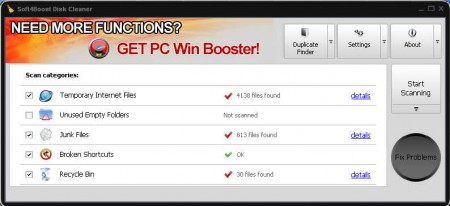
To find files click on Start Scanning program will then list them on the left side. After you do that clicking on the Fix Problems will start deleting unwanted files.
Find and delete duplicate files and folders
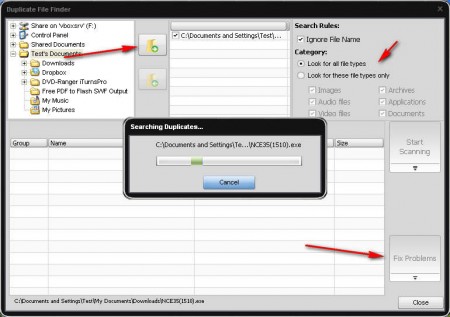
Searching for duplicate files and folders is very easy. Just select the location where you want to look for duplicate files, add it to the list, choose which search parameters you want and then hit Start Scanning. After the scan is finished, just click on Fix Problems and you’re done. Soft4Boost Disk Cleaner offers a lot of options for speeding up the computer and deleting unnecessary files, so make sure to try it out, it’s free.
