Speak-A-Message is a free voice messaging software to send voice messages or voice emails. With Speak-A-Message you can save time on writing an email by recording a voice mail. The recipient can listen to your voice or read the transcript even if he/she does not have Speak-A-Message installed. So this free voice messaging software can also convert voice messages to text. In simple words, this free text a voice software lets you play back the recorded voice and it automatically types the recording in a message box. It will give you a transcript of the voice message received.
In addition, you can also send photo messages by clicking on “Photo” given in at the navigation tab of the software. You can also create your own design for the surface of the voice recorder and send it along with your message. The recipient will see the skin while listening to the message.
Also check out our featured post on Text to Speech Software.
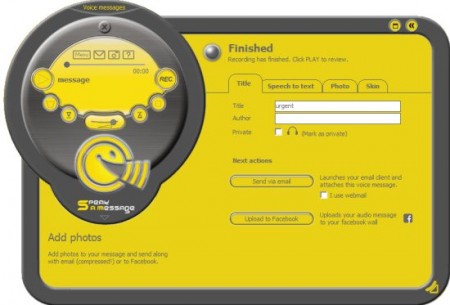
In addition, you can also record comments on your photos and send them. This free voice messaging software has an option to spice-up the voice message with additional sound effects. Speak-a-message works with browser-based email (web mail). This free voice messaging software has the ability to play-back recorded audio messages on common media players. You can also create slide shows of photos with audio at the background.
Besides, you can also share your audio slide shows through email or through social networks. This free voice messaging software has the option of inserting voice comments into MS Word documents. The most alluring feature is that users can upload voice and photo messages to their Facebook wall.
How to Download this free voice messaging software :
- Visit the website
- Click on Download “Speak-A-Message”
- Click on ‘Save’
- The installer then downloads the Speak-A-Message installation
- Click on ‘Run’
- Start and surprise your Facebook friends!!
A 4-minute voice message can be recorded in only 500kB size. The software is good at compressing audio messages. You can send audio messages through your email. This free voice messaging software is supported with few operating systems Windows 7, Windows Vista , Windows XP. However, speech recognition option is not available on Windows XP. Also check out free Text to Speech for Foreign Languages reviewed by us.
In short, Speak-A-Message is an excellent free voice messaging software that helps to send voice messages and voice emails, thereby saving time in jotting down an email. Go ahead and download Speak-A-Message free.!!
