• Home
  • Software Testing Service
  • About US
    • Privacy Policy
    • Disclosure
  • Write For Us
  • Submit Software
  • Contact Us
    • Subscribe
I Love Free Software
Best free software available all over the web. The free software categories include Windows Software, Social Networking Tools, and software installation videos.


  • Featured
  • Windows
  • Web Applications
  • App Store
  • Android
  • iPhone
  • iPad
  • Windows 8
  • Social Networking
  • Programming Tools

Download Desktops – Create Virtual Desktops in Windows

By Anvin on April 13, 2010 | Sponsored Links

Desktops is a free software from Microsoft Sysinternals that lets you create up to four virtual desktops. It is very good software for organizing different windows that you open on your system.

The virtual desktops created by this application can let you check your mails on one desktop, one for browsing on the web, and use the other desktop for some other purpose. The best part about Desktops is that it lets you get rid of the clutter of the windows that you are  not using.

[Also Read: 4 Free Desktop Managers that Add 3D Effect to Desktop]

Sponsored Links

Using Desktops

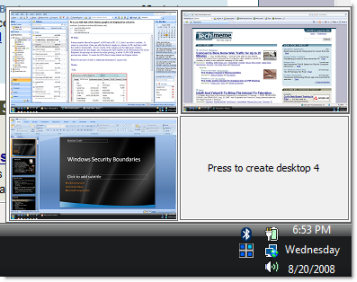
The application is of 60kb only and you do not even have to install it. Just download the application and it will start running by creating an icon in the system tray on the taskbar.  When you click on it, you will be shown four boxes. In the first box, you will see the image of your current windows, and by clicking in other boxes you can create more desktops. As simple as that.

Desktops is a very effective way to unclutter your desktop.

Here are the features of Desktops:

  1. It is a free application that lets you create up to four virtual desktops. You can  swap desktops by clicking the respective desktop number on the system tray icon of Desktops.
  2. It is a good application for organizing your windows.
  3. A very lightweight application.
  4. To use it, you do not have to go through any installation procedure. The application can be used without installing.
  5. You can keep each desktop for different purpose such as for reading mails, surfing the web, etc.
  6. By clicking on the system tray icon, you can view the preview of the desktops that you have opened.
  7. You can make the application automatically launch from the desktop or by making use of the shortcut keys.

Another interesting read: 3 Free Software to Get Mac Style Toolbar on Windows

Home Page: Click Here
Works With: Windows
Free / Paid: Free

Link to This Page:


You Might Also Like:

  1. Virtual Dimension – Create Virtual Desktops in Windows
  2. Download VirtuaWin Free: Create Virtual Desktops in Windows
  3. Create Multiple Virtual Desktops to Manage Tasks: Finestra
  4. Free Virtual Desktop Software To Create Upto Four Virtual Desktops
  5. Free Virtual Desktops for Windows: Xilisoft Multiple Desktops

Be the first to know about Latest Free Software:

  • Join us on Facebook
  • Subscribe to our RSS Feed
  • Follow us on Twitter
  • Subscribe to Email Updates:

Posted in Desktop Enhancement | Tagged virtual desktop, virtual desktops | Leave a response

Anvin

« Previous Next »

Featured Posts

  • Top 7 Free Launchers for Android
  • 5 Free Snippet Managers To Manage Code Snippets
  • 5 Free Online Tools To Test Website In Different Resolutions
  • 5 Free Microsoft Access Alternatives
  • 5 Free IP Notifier Apps
  • 5 Online Mapping Websites
  • 5 Free Alternatives To iGoogle
  • 7 Websites To Download Windows 8 Themes

Join More than 15,000 Followers!

Enter your Email Address
  • Submit Software
  • Software Testing Service
  • Write For Us
  • About Us
  • Privacy Policy
  • Disclosure
  • Contact Us

Link to Us:

Did we review your software here? Feel free to flaunt this badge on your website:

Free Software

Use this Code:

Copyright © 2013 I Love Free Software.

Powered by WordPress and Hybrid. New - H