Gear Software Manager is a free software management program. The software scans software installed on you computer to make sure they are all up to date. The program also can be used to download any new updates of programs found online. The program also maintains a list of vital software which one must have and offers to install listed programs not found on your computer.
Features of this free software update management program
- Windows and registry cleaning feature
- Automatic update searching
- Must have software list to inform you of the most important software to have
- Download buttons for available updates
How to use it
The installation is quite easy . The installer is bundled with the infamous Babylon Toolbar. The interface is very simple and very user friendly.
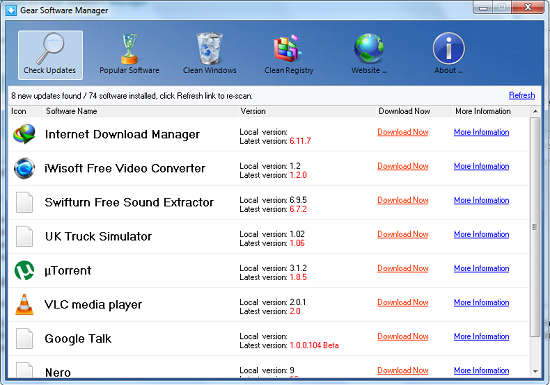
On first launch, the program prompts you to allow it to search for updates for installed programs. Search results are displayed in a list containing program names, current and new versions, download buttons and buttons for accessing more information regarding the update. The file list can be updated by clicking the Refresh button. To download a copy of the program update click the Download Now button. To view more information regarding the program and available downloads click the More Information button.
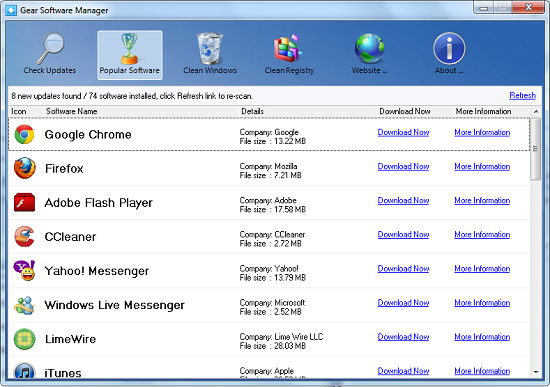
The must have list contains a number of basic but very useful software update which is expected to be installed on any computer. The program generates a list of files which should be installed on any machine but are currently not installed. The list contains names, file sizes, version numbers and download links. On clicking the download button, the program automatically directs you to its homepage where you can download a copy of the software.
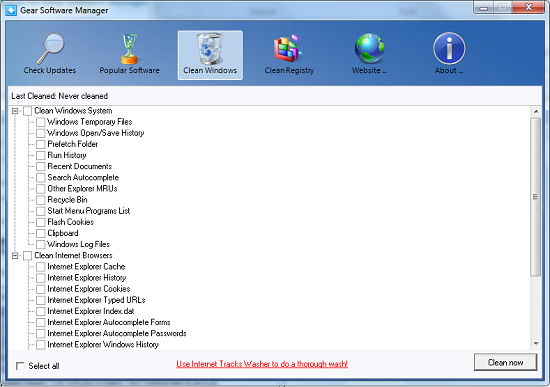
Windows installations require constant clean up if their performance is to be always optimized. The clean windows feature allows user to clean up their windows installation. Cleaning option includes deleting windows temporary and internet files, deleting browser and system history, emptying the recycle bin, clearing the clipboard, deleting browser cookies and deleting windows log files among other things. To clean your windows installation, check options you want cleared and click the Clean Now button.
The windows registry also requires constant clean up. The status bar below the program icons shows the last time the registry was cleaned. To clean the windows registry, click the Clean Registry button. The program cleans up orphaned windows registry items like shared DLLs, fonts, help files, settings and unused shortcuts. The program provides a registry backup feature which is activated by checking the Undo checkbox. In case anything goes wrong, you can always restore the registry to a previous correct state.
Opinion
The software update program generally makes you work very easy. However I was not convinced it works as it should. For example it listed a version 1.8.5 of UTorrent as a the latest version than the current installed version 3.1.2. Inclusion of the windows and registry clean up features allows you to manage your computer from one application. The presence of adware was not very good but keeping in mind that the software is for free, you wont have too many complaints.
Verdict
Gear Software Manager is a simple way to get all your software update and programs in latest version in one go.
