Uniclau is a free password manager which has a very unique way of dealing with the problems of forgotten passwords by using your iPhone or your Android smartphone. Forgetting passwords is something like the rite of passage that every internet user has to go through, but after a while you get annoyed by all the different passwords that have to remembered. This is where Uniclau, free password manager can be used to make your life at least a little bit easier, so that you don’t have to worry about your passwords.
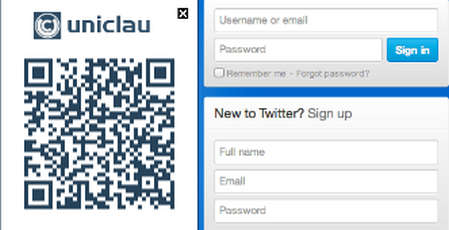
What you see above is what you will get every time that you access a website where you need to enter login information after of course you have Uniclau installed on your browser. For the time being Uniclau password manager only supports:
- Google Chrome
- Safari
- Mozilla Firefox
and when it comes to the mobile applications, which are very important, you need to have a smartphone that runs iOS or Android, because the mobile application are only available for these two smartphone operating systems. Download links for everything that you need can be found on the main website, of course for the smartphone apps you’ll have to open up their respective app stores.
Secure password managing with QR codes
Uniclau uses a very innovative combination of QR codes together with a website browser extension in order to give users encrypted password protection and managing. First step that you need to take would be to install the smartphone application from Uniclau, where you can enter password information for all the online accounts that you want to manage with the help of Uniclau. We said that you won’t have to type in anything, you don’t, except here. The Uniclau system has to get your data from somewhere. Some might feel a bit anxious giving their private information to unknown site, Uniclau is a trusted website, and everything you enter for safe keeping with Uniclau is heavily encrypted, so your info is safe.
After all of your information is entered and stored with Uniclau app, or should I say main website, you’ll have to install the browser extension which is important because it will start displaying the QR code next to every login field that you visit. Displaying the QR code is not the only thing that browser extension will do, another important job that it does is communication between the Uniclau server and the smartphone. While you have the login field open, use your smartphone to scan the QR code which contains data important for identifying this particular website you’re on and also your session and computer IDs. All this will be sent to the main Uniclau server which will send the login credentials for your account and automatically fill out the login filed.
Conclusion
With all the different social networks, forums, even payment processors you have to have a lot of different passwords to increase you’re security. Keeping track of all of them is not a simple thing to do, but with Uniclau things get a lot more easier, all you need is your smartphone and you can use it to access all your accounts, completely free.
