jOrgan is a free virtual organ that is designed to be a MIDI console and can turn your PC into an organ. In the stored files it contains every detail for defining the usage and working of that organ. This free virtual organ comes a few examples of dispositions that have been already created to understand the software in a much easier way. Although once you get familiar with the software it is just your imagination which you need in order to use this amazing software as per your needs. Most of the users of this free PC keyboard organ create their custom dispositions to meet all their personal requirements.
Installing jOrgan
The process of installing this free PC keyboard organ can be quite complicated especially when one might end up getting lost when at the developer’s website. When at the website one needs to click on the link to the installation section listed on the left of the main page. Clicking on those you would be redirected to a new page where you need to scroll down and click on the download link at the center of the page. Once you do so a zip file gets downloaded on your system. You would be required to unzip the file and run the installation process. Upon installation you would be ready to use this free virtual organ by just launching it from the shortcut on your desktop. You can also play drums on your PC with these top 5 software, play piano with Sweet Little Piano or create virtual music easily with BandzPro if you love music.
Using jOrgan
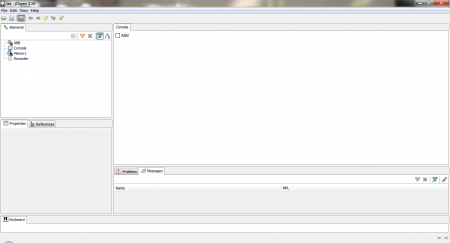
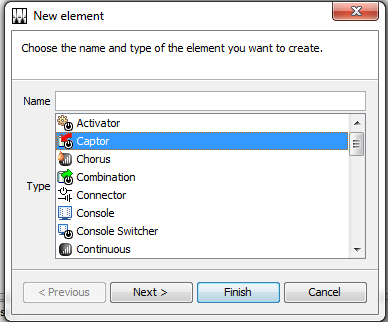
Once you launch this free PC keyboard organ you would see a small window appear on your screen. The window is compact but comes in with great options. In order to build disposition the software provides you several building blocks which have been placed in the console. Some of them have been listed below among the 35 building blocks available with the software.
- Activator
- Captor
- Chorus
- Combination
- Console
- Console switcher
In order to proceed and create one by yourself you would be required to click on the file and then create a new file to start the file creation process. Once you do so you will have all the options to play around appear on your screen. Now you are ready to use the software and create the disposition file for yourself. While you use the software along with the GUI extension installed you would see two modes i.e. construction and playing. You have the option to move from one to another mode by clicking on the button available in the toolbar.
While in the Playing mode you can use almost all the elements of Disposition along with the MIDI inputs and outputs. On the other hand the construction mode gives you the option to alter the current disposition where you may add new elements, and edit or remove the existing ones. A few shortcuts which might come in handy while using the software are Ctrl+C (copies the element and its properties), Ctrl+D (copies and pastes the selected element converting them into an entirely new element which includes the original properties), Ctrl+V (pastes the new elements that had been copied by the use of Ctrl+C key along with the properties).
Overall, this free virtual organ is pretty vast and can only be used by experts who are aware of the terminologies and technicalities of creating dispositions. Reading the online tutorials or going through the other dispositions that has already been created by the users would definitely benefit you to use the software in a much better way. Download jOrgan free.
