FreeCAD is a free 3D modeling application which can be used by scientists or anyone else who’s interested in creating 3D modular sketches of practically anything, mechanical parts, architectural objects or engineering structures for which you can also use 2D editing of whatever it is that you’re doing. FreeCAD can be used as an alternative to commercial applications like AutoCAD which are gonna do very similar tasks to those of FreeCAD only they come with a price tag.
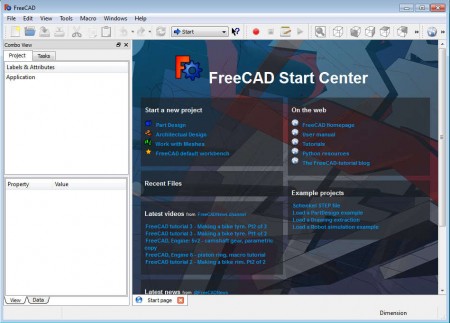
Work area of FreeCAD is located on the right side of the application window, and important toolboxes can be seen in the left sidebar which can be seen on the image above. By default, after a very easy and uneventful installation, upon opening up the FreeCAD for the first time you should see the Start Center where you are gonna be greeted with resources, how to’s and also a start new project selection window. It’s very useful if you don’t have a lot of experience with CAD software. Everyone who’s used similar type of applications shouldn’t have any problems adapting to FreeCAD in a very short period of time. Useful features found in FreeCAD would be:
- 3D computer aided Part and Architectural design
- Complex 3D operations for complex shapes are available
- Objects can be fully programmable in Python
- Support for recording macros – for repetitive tasks
- Tabs for when you have several designs opened
- Add additional features with the help of plugins
- Good format support – IGS, STEP, BREP, SVG, STL, AST, OCA etc.
Great thing about FreeCAD, next to the fact that you can freely draw various different designs, would be that you can run this free 3D modeling application on all the major operating systems, Windows, Linux, Mac and BSD are supported, so regardless of which operating system it is that you use, FreeCAD should be working for you just fine.
Similar software: Autodesk123, DraftSight, CadStd.
How to create 3D models with the help of FreeCAD
If you’re new to computer aided design making, it’s best that you open one of the examples from the start menu and you start studying the application by modifying it.
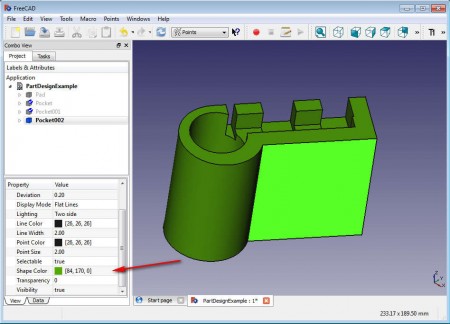
Or alternatively you can start with some of the tutorials which can also be found on the welcome screen. On the image above we have a model opened and you can see how each parameter of the design can be edited in the left sidebar. At the top portion of the window the various different components of the design can be selected, and below we can adjust the parameters.
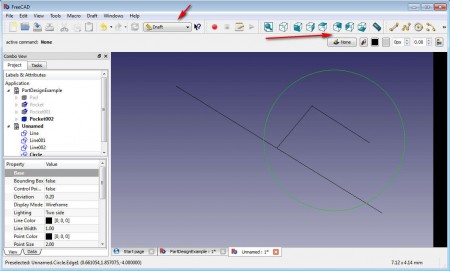
The first image above you can see that we adjusted the color of the example project, on the second, we now have drawing activated, various different modes of operation can be selected at the top dropdown menu, where the arrow points. Here you can now freely draw the basics of your creating, before moving on to something more advanced.
Conclusion
FreeCAD comes with a lot of useful features which you can use in order to manipulate and edit 3D models easily. It might take some time for getting used to but FreeCAD can be used as a serious alternative to paid commercial software like AutoCAD.
