Ispring Quizmaker, as the name suggests is a great tool for creating effective and captivating assessments, quizzes, and online-offline tests for e-learning and other businesses in a matter of a few minutes. This software comes with effective quiz authoring tools which can be easily accessed using its intuitive and simplified user friendly interface.

Features of this free Quizmaker:
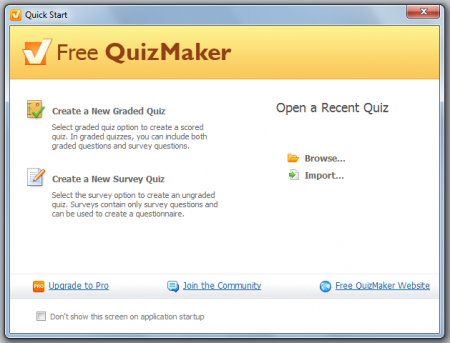
- Types Of Questions: On the starting screen it displays the type of quizzes which you can create:
Graded Quiz
Survey Quiz
Questions can be of 23 different types: 11 types for a graded quiz and 12 for a survey based quiz.
In the free version of this software only 6 types of questions are provided namely True/False, Multiple Choice, Multiple Response, Yes/No, Pick One and Pick Many.
- Sharing and Output: It can work effectively as a standalone unit and also as a part of e-Learning course. In other words, the quizzes which you create can also be embedded into blogs and websites. It can also be sent via e-mail or can be published to any AICC/SCORM supported LMS (Learning Management System). Any quiz created using this software can be exported as a SWF or an EXE file. The quiz can also be exported to Microsoft Word thus making it easier to check for spelling mistakes and other grammatical mistakes.
Flexibility:
- Using this powerful quick making software, you can also create Flash based quizzes which allows you to incorporate pictures, music, videos and animations in your quizzes thus making it all the more interesting and interactive.
- Provision is there to add in formulae and equations to construct comprehensive math exams.
- You can also insert slides containing additional information between various questions.
- Tools for recording and tracking scores of individual users are also provided. The administrator or the quiz master can also set the test duration and can also trace the number of times a user attempted a particular question. You can even set pre-defined feedback based on the results of users.
Customizable Labels: Each and every item in the quiz can be customized for every particular project. This facility is versatile for constructing tests in different languages.
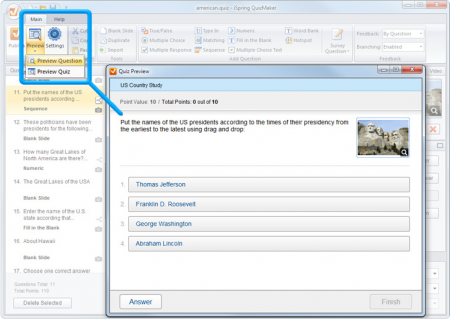
Live Preview: The test creator can preview a particular question or the entire quiz to see the test through the eyes of the end-user. You can experiment with the quiz content and can preview the quiz instantly. This feature is particularly useful if you are publishing the quiz straight to LMS or if the end user gets access to the final version of the quiz straight away.
Customization: All types of quizzes can be completely customized as and when required. Shuffling of answers and random selection of questions from a question bank allows each user to be presented with different sets of questions.
Download:
The software from iSpring is a 20.80MB downloadable file and can be downloaded from here. It supports both 32 bit and 64 bit versions of Windows XP, Vista and 7. More information regarding the system requirements can be obtained from here. Along with the free software you can also try the pro version on a 30 day trial with full functionality.
The Final Verdict:
This Free Quizmaker from iSpring is a very flexible and versatile tool for creating creative and interactive quizzes. Its user friendly interface makes it all the more easy for the user to create graded quizzes and surveys and thus this software can be recommended for use.
