• Home
  • Software Testing Service
  • About US
    • Privacy Policy
    • Disclosure
  • Write For Us
  • Submit Software
  • Contact Us
    • Subscribe
I Love Free Software
Best free software available all over the web. The free software categories include Windows Software, Social Networking Tools, and software installation videos.


  • Featured
  • Windows
  • Web Applications
  • App Store
  • Android
  • iPhone
  • iPad
  • Windows 8
  • Social Networking
  • Programming Tools

How To Set Video As Desktop Background

By Mohit Mohan on January 11, 2012 | Sponsored Links

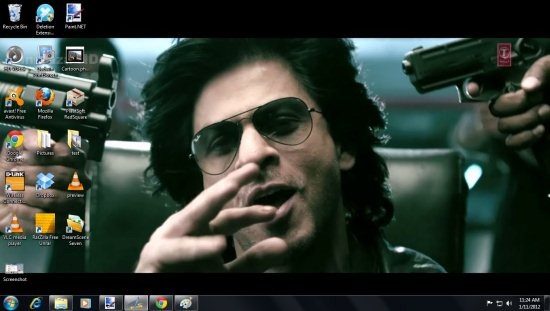
Dream Scene Seven is free software for Windows 7 which allows you to set video as desktop background. This free software basically allows you to set video in formats like WMV and MPEG as your desktop background. After the installation of this utility software, you will come across an extra option of “Set as desktop background” in the context menu of the video file in, WMV format or MPEG format, Select this option from the context menu of a video file to set your favorite video as desktop background.
DreamScene Seven 002
Sponsored Links

After trying out this free software, I am in love with it, with the help of this free software I added one my favorite music video as my desktop background. I hope you would also enjoy your favorite video being played as the desktop background, but sorry to inform that you won’t be able to hear the audio, as it is just like your desktop wallpaper in motion. Moreover, you may also pause the desktop background by right clicking on the desktop and selecting “Pause Dream Scene”.

Don’t forget to check out animated desktop wallpaper software.

How To Set Video As Desktop Background

  • Go onto the homepage of Dream Scene Seven, and click on “Download” link.
  • Exe file of Dream Scene Seven gets downloaded into your PC.
  • Run the exe file as administrator.
  • Follow further installation procedure.
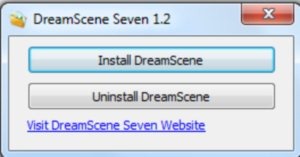
  • You will come across a pop-up confirmation window with two options, which are, “Install DreamScene” and “Uninstall DreamScene”.
DreamScene Seven 001

  • Click on “Install DreamScene” button.
  • Select any video in WMV or MPEG format, right click on video and select “ set as desktop background” option from the context menu.
  • Now check your desktop and watch your favorite video being played in the desktop background.

Also, check out free wallpaper changer.

Dream Scene Seven is a free utility software which allows you to set your favorite videos as desktop background like never before. Download Dream Scene Seven and try it out.

Home Page: Click Here
Works With: Windows 7
Free / Paid: Free

Link to This Page:


You Might Also Like:

  1. How To Use VLC Media Player To Set Video as Desktop Background
  2. Use Video As Desktop Background with Desktop Movie
  3. How To Set A Webpage As Desktop Background In Windows 7
  4. Set Video Playlist as Desktop Background: Irwin
  5. BingRounder: Set Images from Bing as Desktop Background

Be the first to know about Latest Free Software:

  • Join us on Facebook
  • Subscribe to our RSS Feed
  • Follow us on Twitter
  • Subscribe to Email Updates:

Posted in Desktop Enhancement | Tagged desktop background | Leave a response

Mohit Mohan

« Previous Next »

Featured Posts

  • 5 Free Snippet Managers To Manage Code Snippets
  • 5 Free Online Tools To Test Website In Different Resolutions
  • 5 Free Microsoft Access Alternatives
  • 5 Free IP Notifier Apps
  • 5 Online Mapping Websites
  • 5 Free Alternatives To iGoogle
  • 7 Websites To Download Windows 8 Themes
  • 5 Best Free Calculator Apps For Windows 8

Join More than 15,000 Followers!

Enter your Email Address
  • Submit Software
  • Software Testing Service
  • Write For Us
  • About Us
  • Privacy Policy
  • Disclosure
  • Contact Us

Link to Us:

Did we review your software here? Feel free to flaunt this badge on your website:

Free Software

Use this Code:

Copyright © 2013 I Love Free Software.

Powered by WordPress and Hybrid. New - H