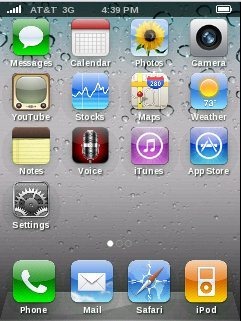
Fake iPhone 4S is a free Android App that converts Android home screen look into a iPhone home screen look. This app is a full-screen working replica of iPhone 4S home screen. Trick your friends into thinking that you have a new iPhone 4S by getting iPhone on Android. Have your Android and iPhone together in your individual Android phone. It even replaces your phone’s status bar, so there is no hint of Android left.

Android provides an awesome interface and graphics on its home screen. But there are some people who like interface of iPhone more than of Android. For those people, this little nifty app helps you pimp your Android, in order to look just like iPhone 4S and can get iPhone on Android. Now it’s in your hand, whenever you want to convert Android to iPhone or iPhone to Android. It provides sliding pages, more icons and even working clock, more realistic than ever with iPhone on Android.
You can check out Go Launcher EX App for Applying themes on Android reviewed by us.
Some Key Features Of Fake iPhone 4S App To Get iPhone On Android:
-
It provides a real home screen of iPhone on Android.
-
Make your friends to think that you have a iPhone 4S.
-
You can view a full-screen picture of an iPhone 4S on your Android device and also the icons are click-able.
-
Icons are very real as of iPhone.
-
The interface of the app is very simple as of a real iPhone 4S and is really a fun app.
-
You can slide the pages.
-
It makes the status bar hidden, so there is no hint of Android.
-
Even the clock in the status bar of iPhone home screen on Android works.
-
All the icons on the home screen provided by this app works like iPhone.
Also check out Zedge Wallpaper App and Live Wallpaper App for Android reviewed by us.
How To Install Fake iPhone App:
- Just login to “Android Market” or scan the QR Code below.

- Click on “Search”. Type Fake iPhone 4s” in search tab.
- Click on “Fake iPhone 4s”.
- Click on “Install”.
The free Fake iPhone 4s, to get iPhone on Android will be automatically installed. Fool your friends by converting your Android device look in iPhone look. Enjoy the different look.
