Ariolic Disk Scanner is a free software to identify bad sectors on hard drive. This free Disk Scanner reads raw hard drive and displays the result as a picture of disk, where the good and bad sector are marked, so you can see the status of your disk at a glance with errors. If you see any Red dots, you know your disk has some bad sectors that need to be fixed.
Apart from displaying the good and bad clusters, this free software identify bad sectors on hard drive also lists the files where errors occurred. This free scanner software scans hard disk, scans flash drives, scans USB hard drives, scans CD/DVD, and scans Floppy disk.
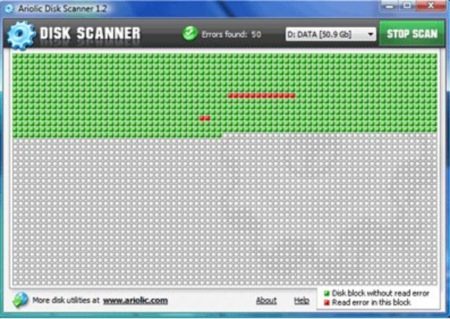
This free software to scan disk does not require any setup, it is a portable software. You can run it directly from CD or a Flash Drive; or download on your hard drive, and run from there. With Ariolic Disk Scanner, you can view hard drive errors quickly at a glance.
Some features of this Freeware to Identify Bad Sectors on Hard Drive:
- Find bad sectors on hard drive
- List files where errors occurred
- Display free disk space
- Scans hard drive, flash disk, CD, floppy
Once you have identified the bad sectors, you need to tell your computer about them, so that those sectors are not used for further file storage. Ariolic Disk scanner only detects the errors on a computer, it does not lets you mark the bad sectors. In order to mark the bad sectors, just follow the quick given steps:
How To Mark Bad Sectors on Hard Drive:
- Go to Start –> My Computer
- Right click on the hard disk or partition that you want to check for errors.
- Click on properties, and then “Tools”.
- Under “Error Checking” click on “Check Now”.
- Then, select “Scan for and attempt recovery of bad sectors”, and click on Start.
Check out our full-fledged post on How to Improve Hard Drive Performance. Else you can clean up the temporary and junk files with Disk Cleaner reviewed by us.
How to Download Software to Identify Bad Sectors
- Go onto the website
- Click on “Download Now”
- Click on the downloaded icon in order to launch
yup…there you are…you will soon find Ariolic Disk Scanner scanning your disks or drives, and fetching all good and bad clusters.
You might also like to read our post on Duplicate File Finders.
In a nutshell, Ariolic Disk Scanner is a good utility disk scanning software which is simple and quick to use for scanning. It is a must for everyone to keep your PC and disk drives safe. Go and get this software to scandisk free..!
