Microsoft USB Fix It is a free software to fix USB problems. This USB fixer has bene developed by Microsoft to Fix most common USB problems which you face.
Normally we face USB problems such as, we are not able to remove device conneted to USB drive in “Safely Remove Hardware” dialog box or sometimes you come across a message saying “USB cannot be ejected currently”. USB Fix it is here for rescue, it allows you to fix USB problems in no time.
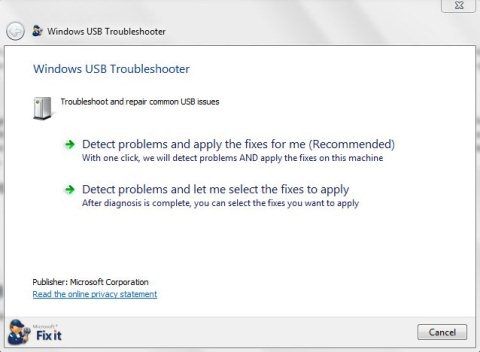
This free software checks for the most common issues like, USB device in unrecognised, or you are not able to eject USB device through “Safely Remove hardware” dialog box, or USB printer is not printing.
For repairing USB issues, this USB troubleshooter offer 2 troubleshooting modes. First one is “Detect problems and apply the fixes for me” mode. If you are using this mode, the program will look of USB related problems on your PC and fixes them automatically.
Second one is “Detect problems and let me select the fixes to apply” mode, this mode also searches the USB problems but allows you to choose the fixes to be applied.
Also, check out free software to format pen drive.
Some Key Features Of Microsoft USB Fix It To Fix USB Problems:
- Simple and easy to use software.
- No installation required.
- Offer 2 ways of troubleshooting and repairing USB issues.
- Fixes most common USB problems.
- Works with both 32-bit and 64-bit Windows operating system.
You would also like to check out free software to format memory card.
How To Get Started With Microsoft USB Fix It To Fix USB Problems:
- Go on to the download page of this free software and click the Download link below.
- An exe file of Microsoft USB Fix It gets downloaded into your system.
- Run the exe file and follow further step by step installation procedure.
Microsoft USB Fix It is a smart and straight-forward Microsoft software wherein you can repair most common USB problems associated with your computer. Download Microsoft USB Fix It for free.
