Essential HDR is a free digital photo editor tool which is best suited for High Dynamic range tone mapping applications. This free revolutionary software is best known for its exceptional quality and amazing performance. This software combines the two-tone mapping algorithms: Fast Tone Balancer and Detail Revealer in a single application. Since HDR images cannot be viewed on mainstream monitors hence you need tone mapping to transform the HDR photos into normal dynamic range photos so that they can be viewed in normal computer display. This is when this photo editor comes into use and would be of immense help if you own a DSLR camera!
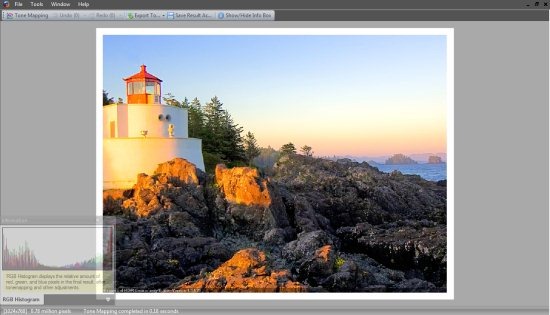
How to use Essential HDR community edition an effective Photo Editor
Essential HDR community edition is a great tonemapping software with powerful functionalities to meet your requirements if you love playing with images. The interface is simple and at the same time has sophisticated functions to meet the needs of experienced users. Whether you are dealing with high dynamic range images, medium dynamic range images or low dynamic range images, HDR community edition free software can tonemap any of these images.
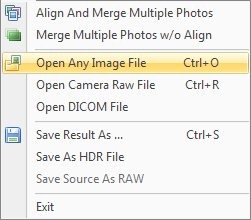
- Open any image file, camera raw file or DICOM file. You can also obtain images after aligning and merging photos or merging photos without aligning them.
- Next, you need to hit the Tone Mapping option and choose one of the algorithms Fast Tone Balancer or Detail Revealer. Fast Tone Balancer performs the tone mapping operation in a faster mode by presenting an immediate visualization of the image. On the other hand, Detail Revealer reveals the fine details of the HDR image.
- Different options in any of these modes can be chosen including contrast, details etc. and save the result.
Features of HDR community edition
- You can use different images for the purpose of tonemapping which includes images after alignment and merging, merging images but without aligning, images in different formats, single camera raw files or DICOM files.
- Availing the functionalities of Fast Tone Balancer becomes possible which can produce optimal curves while mapping the source to output files.

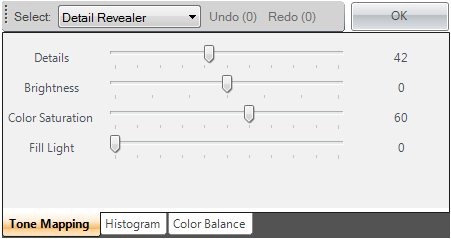
- Using the Detail Revealer, you can get more detail and information in the tonemapped image. One of the essential features of the same being that you can easily control the level of details you wish to reveal so that your image is simple and good.
System Requirements
The free photo editor has minimal requirements and requires Microsoft .Net Framework or higher to function. 32-bit windows XP SP2 and higher or Windows Vista SP1 and higher are preferred however the software can also work well on 64-bit Windows XP or Vista.
Verdict
Essential HDR photo editor has some great features and has great potential to evolve. It can be a lot better if more functionalities are added to the same. One of the major caveats of the software is that the ‘Fill Light’ option under ‘Detail Revealer’ isn’t functional. This is prominent when the users are working on Windows 7 operating system. While the other options are functional and add to the features of the program. On the whole, the free digital software is worth a try!
Download Essential HDR Community Edition free.
