• Home
  • Software Testing Service
  • About US
    • Privacy Policy
    • Disclosure
  • Write For Us
  • Submit Software
  • Contact Us
    • Subscribe
I Love Free Software
Best free software available all over the web. The free software categories include Windows Software, Social Networking Tools, and software installation videos.


  • Featured
  • Windows
  • Web Applications
  • App Store
  • Android
  • iPhone
  • iPad
  • Windows 8
  • Social Networking
  • Programming Tools

Easy2Sync: Synchronize Files Between Multiple Computers

By Mayank on December 10, 2010 | Sponsored Links

Easy2Sync is a free file synchronization software which allows its users to synchronize files between multiple computers in a safe and secure way. If you have same data on multiple computers at your office or if you have same data between two computers you use, then you can use this freeware, Easy2Sync to automatically synchronize files on your computer. Transfer the updates and changes made to the other computer containing the same file, cool feature isn’t it.

This freeware, Easy2Sync while doing synchronization and transferring content to other computer will ask for a confirmation and if you have selected option to update it automatically, then it does not ask for a confirmation. You can easily synchronise files on FTP servers, local network and can also make it reduced to your system tray. You can also use Dropbox, or SugarSync for synchronization.
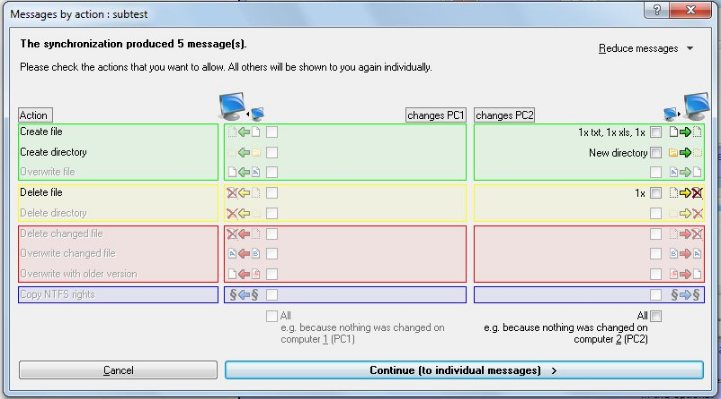
Easy2Sync
Sponsored Links

All the timestamp issues are automatically handled by this freeware, Easy2Sync. It also recognises all the renamed directories very easily. Thats not all, you can also create backups, move all your files with Easy2Sync software. While you are working in a team or you are working single, Easy2Sync can be used anywhere on laptops, PC’s and you can create backups, FTP synchronization and share your files with people. If you have two or more PC’s with different operating system then you can also try free software to sync files between Windows and Linux.

Let us see how to synchronize your filezilla, a FTP client for configuration between multiple PC’S. This is one of the great features included in the latest version of Easy2Sync software.

  • First you need to install Easy2Sync for files.
  • After this step you have to create a new task
  • Now use the drop down box for data source selection and select filezilla
  • Repeat the same for second storage of data and you are done.

This freeware, Easy2Sync is a very good software as the synchronization can be done on any network whether it is LAN or WAN and you can easily synchronize unlimited files and directories with this software, Easy2Sync.

Home Page: Click Here
Works With: Windows 2000, Windows 2003, Windows XP, Windows Vista, Windows 7
Free / Paid: Free

Link to This Page:


You Might Also Like:

  1. How to Synchronize Files Across Multiple Computers: CopyTo Synchronize
  2. Synchronize Files Synchronize Folders: SyncBreeze
  3. JFileSync: Synchronize Folders between Multiple Computers
  4. Synchronize Modified Files, and Create Incremental Backups to Revert to Old Version: Sync Last Files Free
  5. File Synchronizer: Synchronize Data between Folders

Be the first to know about Latest Free Software:

  • Join us on Facebook
  • Subscribe to our RSS Feed
  • Follow us on Twitter
  • Subscribe to Email Updates:

Posted in File Utilities | Tagged free software, freeware, multiple computers, sync, synchronize, synchronize files | Leave a response

Mayank

« Previous Next »

Featured Posts

  • 5 Free Snippet Managers To Manage Code Snippets
  • 5 Free Online Tools To Test Website In Different Resolutions
  • 5 Free Microsoft Access Alternatives
  • 5 Free IP Notifier Apps
  • 5 Online Mapping Websites
  • 5 Free Alternatives To iGoogle
  • 7 Websites To Download Windows 8 Themes
  • 5 Best Free Calculator Apps For Windows 8

Join More than 15,000 Followers!

Enter your Email Address
  • Submit Software
  • Software Testing Service
  • Write For Us
  • About Us
  • Privacy Policy
  • Disclosure
  • Contact Us

Link to Us:

Did we review your software here? Feel free to flaunt this badge on your website:

Free Software

Use this Code:

Copyright © 2013 I Love Free Software.

Powered by WordPress and Hybrid. New - H