Here, are 4 free currency converter add-ons for Firefox. These Currency converter add-ons basically convert currencies right there in your web browser. With the help of these currency converter extension for Firefox, you don’t need to check different websites to find latest exchange rates.
These Firefox add-ons offer an easy way to know the currency rates while working on Firefox. If you are into foreign trade & currency exchange, then it’s worth trying out these add-ons.
Simple Currency Converter

Simple Currency Converter, as the name itself suggests is a free currency converter add-on for Firefox. This add-on is capable enough to automatically convert Euro, Dollar, Russian Rubles, and British Pound prices to a user’s local currency. You can view the conversion results on any webpage by simply placing the mouse cursor on the add-on icon. This Firefox add-on supports 124 currencies and comes with a custom price formatting option. Simple Currency Converter is even capable to automatically detect your regional settings. Add This currency converter add-on to your Firefox for free.
Converter
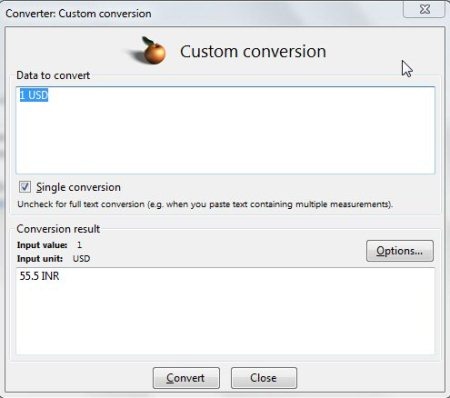
Converter is another free currency converter add-on for Firefox that lets you convert currencies on your Firefox. Converter is not just a currency converter, it even deals with time conversion and unit conversion. This Firefox add-on converts quickly and shows you the results instantly. For using this add-on you need to add this add-on to your Firefox and restart your Firefox. Now look for the icon of this add-on at the bottom right corner of your Firefox screen above the task bar. If you have found that icon, then simply right click the icon and choose the options option. Within the options Window under Currency conversion option, you need check the Enable currency conversion option and choose your preferred currency from the dropdown menu. Now close the options window and again you need to right click the add-on icon and choose Custom conversion option. Input the data to convert (for example 1 USD) and click the convert button, in no time it shows you the results in the results under conversion results section in the same window. In this way you can easily convert currencies.
Don’t forget to check out our post on free currency converter apps, extensions for Chrome.
eBay Worldwide
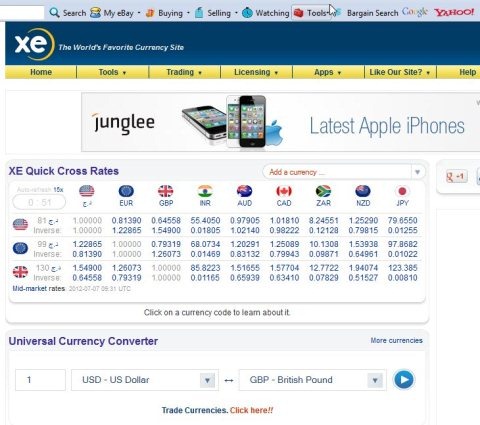
eBay Worldwide a free firefox add-on which adds eBay tool bar to your Firefox. This eBay toolbar include a tools option, within the tools option, you will find XE currency Converter that lets you convert currencies on a new tab in your browser. XE currency converter shows you XE quick cross rates with currencies of different countries and it even comes with a Universal currency converter that lets you convert any currency. Within this currency converter, you need to enter the quantity and choose an input currency and output currency, then you need to click the convert button which looks similar to a Play button. You will see the conversion results in the same tab of your Firefox.
Also, check out free currency converter apps for iPad.
ebookers.com addon
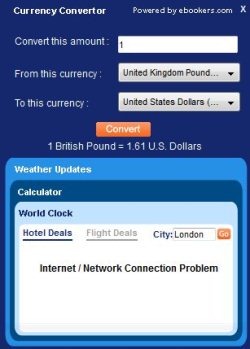
ebookers.com addon is a free Firefox add-on which lets you convert currency, shows you weather update and even acts like a desktop calculator. This multi-function add-on is easy to use and comes with a very basic and clean interface. This Firefox add on allows you to easily convert currencies. For converting a currency, you need to simply left click the add-on icon and click the currency Converter option. Now you need to enter the converting amount or quantity in the convert this amount box. Enter the currency from which you want to convert to another currency in the From this currency box. Now, choose the currency to which you want to convert in the To this currency box and click the convert button. It will show the values below the convert button, so that’s all you need to do for converting a currency.
So, these were some Currency Firefox add-on using which you can easily convert currencies on your Firefox.
