Face Off Max is a creative, free image software which helps you to create funny images by transplanting a face to another body. You can use the templates that the software comes with for creating funny images of your friends and families, giving it a new look altogether. So go on and show your creativity by exchanging heads of your friends with the body of stars or may be a zombie and share it out on your social media profiles such as Facebook.
Installing Face Off Max to create funny images
The installation of this software is like any other application which you might have downloaded before. You need to follow the basic steps as listed below and you would be ready to use the software on your system.
- Visit the developer’s site here and click on the download button.
- As soon as you click on the download button the download process would start and it will take some time before it is actually ready to be installed on your system. The file size is about 22MB which needs a pretty decent connection to make the download process smoother and faster.
- After you have the software downloaded on your system you just need to move further by clicking on the setup file of the program. Clicking on the setup file would initiate the download process and the step by step process would guide you to install the program on your system with ease.
- After you have installed it on your system you are ready to create cool as well as funny images which sure would make others smile and complement your imagination.
If you are looking for a good image editing app, you can try FastStone Image Viewer, Chasys Draw IES and XnView reviewed by us.
Using Face Off Max to create funny images
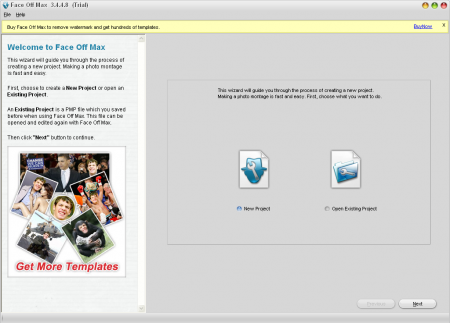
The first screen that pops up on your window comes with two options on it. The two options are:
- Creating a new project
- Opening an existing project
You may choose either of the above depending on what you want to do with the application. For the 1st time users you should select the radio button of new project and click on next. The next window asks you about the body you wish to use for the image you are creating.
You may select from 100’s of templates or a picture which you may have and then click on next. If you clicked on the pre-installed templates then you would be presented with numerous pictures to choose from. Select the one which you think is appropriate and click on next.

Once you select the template you would be asked to select the picture image or face you wish to instill within the template window. In case you wish to use an image of your friends and family then click on picture image and then browse through your system to select the one you wish to use for this purpose.
After this you will need to crop the image and select the colour tone to it. A few more options would be presented to you and you may customize them and keep clicking on the next option and finally the Finish option. The next and the finish options are available at the bottom right of the main window.
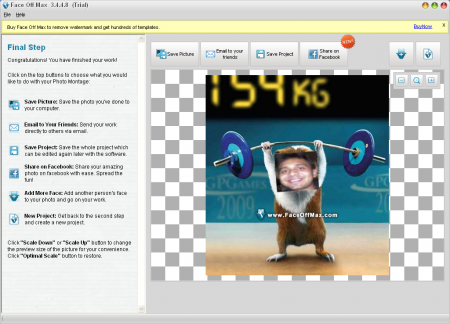
As you are using a trial version the image created would have the link of the developer’s site on it and in case you want it to be removed. The last thing you need to do is save the picture at the desired location on your system and you are ready to share the picture with your friends and family. It surely would make them laugh and enjoy. Download Face Off Max free.
