• Home
  • Software Testing Service
  • About US
    • Privacy Policy
    • Disclosure
  • Write For Us
  • Submit Software
  • Contact Us
    • Subscribe
I Love Free Software
Best free software available all over the web. The free software categories include Windows Software, Social Networking Tools, and software installation videos.


  • Featured
  • Windows
  • Web Applications
  • App Store
  • Android
  • iPhone
  • iPad
  • Windows 8
  • Social Networking
  • Programming Tools

Everything: Fast File Search Utility for Windows

By Ishan Bansal on August 9, 2009 | Sponsored Links

Works on: Windows
Everything is a simple file search  utility for Windows. It shows all the files on your system, and let’s you quickly search for any file using filename.
When you install Everything, it indexes all the files on your system. The indexing process is very fast as only filenames are indexed, and not file content. It can index 1 million files in around 1 minute only!
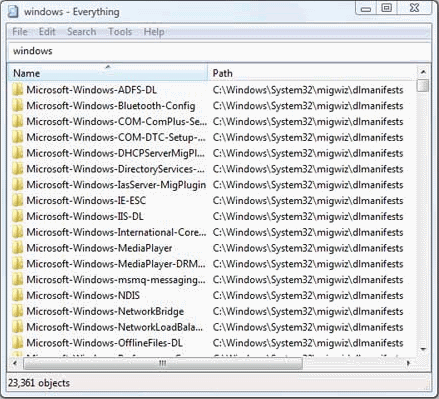
To search for a file, just type its filename, and Everything will quickly search it for you. You can use boolean characters and wild cards when you specify filename to search for different combinations.
One thing to note here is that Everything can search only the filenames, and not the content of the files. So, if you have some idea about name of the file that you are looking for, then this is a really good utility to do a quick search.
Download Using Links at the end.

Works on: Windows

Everything is a simple file search  utility for Windows. It shows all the files on your system, and let’s you quickly search for any file using filename.

When you install Everything, it indexes all the files on your system. The indexing process is very fast as only filenames are indexed, and not file content. It can index 1 million files in around 1 minute only!

Fast File Search In Windows
Sponsored Links

To search for a file, just type its filename, and Everything will quickly search it for you. You can use boolean characters and wild cards when you specify filename to search for different combinations.

Everything is very light on system resources, and consumes minimal amount of memory.

If you are looking for a duplicate file finder, you can try Fast Free Duplicate File Finder.

One thing to note here is that Everything can search only the filenames, and not the content of the files. So, if you have some idea about name of the file that you are looking for, then this is a really good utility to do a quick search.  Download Using Links at the end.

Download:

Download Link: Download Everything Free


Link to This Page:


You Might Also Like:

  1. Fast Duplicate File Finder: Find Duplicate Files on your PC
  2. UltraSearch: Fast File Search Software
  3. Free File Search and Preview Files in Search Results: Agent Ransack
  4. Advanced Renamer: Free Batch File Rename Software
  5. CloneSpy – Free Duplicate File Finder

Be the first to know about Latest Free Software:

  • Join us on Facebook
  • Subscribe to our RSS Feed
  • Follow us on Twitter
  • Subscribe to Email Updates:

Posted in File Utilities, System Utilities | Tagged fast file search, file finder, file search, free file search software, search for files, search utility | Leave a response

Ishan Bansal

« Previous Next »

Featured Posts

  • Top 7 Free Launchers for Android
  • 5 Free Snippet Managers To Manage Code Snippets
  • 5 Free Online Tools To Test Website In Different Resolutions
  • 5 Free Microsoft Access Alternatives
  • 5 Free IP Notifier Apps
  • 5 Online Mapping Websites
  • 5 Free Alternatives To iGoogle
  • 7 Websites To Download Windows 8 Themes

Join More than 15,000 Followers!

Enter your Email Address
  • Submit Software
  • Software Testing Service
  • Write For Us
  • About Us
  • Privacy Policy
  • Disclosure
  • Contact Us

Link to Us:

Did we review your software here? Feel free to flaunt this badge on your website:

Free Software

Use this Code:

Copyright © 2013 I Love Free Software.

Powered by WordPress and Hybrid. New - H