• Home
  • Software Testing Service
  • About US
    • Privacy Policy
    • Disclosure
  • Write For Us
  • Submit Software
  • Contact Us
    • Subscribe
I Love Free Software
Best free software available all over the web. The free software categories include Windows Software, Social Networking Tools, and software installation videos.


  • Featured
  • Windows
  • Web Applications
  • App Store
  • Android
  • iPhone
  • iPad
  • Windows 8
  • Social Networking
  • Programming Tools

TweetWhatYouSpend: Track your Spending Through Twitter

By Ishan Bansal on February 9, 2010 | Sponsored Links

Today I came a very intelligently created service based on Twitter: TweetWhatYouSpend. This free service lets you track all your spendings through Twitter. Sounds unbelievable? Read on.

TweetWhatYouSpend is a very unique Twitter based service that makes it extremely easy for you to track all your spendings just by sending tweets on Twitter. To start using this service, you create a free account on TweetWhatYouSpend, and follow @twys.

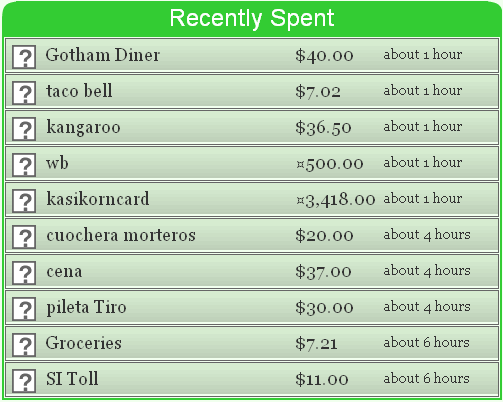
After that, whenever you make some expense, just send a Direct Message to @twsy. TweetWhatYouSpend will track that direct message, will extract expense amount, description, and category from that, and will add these to your online journal. As you keep on sending DMs, your expenses automatically keep getting added to your online journal. Whenever you want, you can login to your TweetWhatYouSpend account, and see all your expenses nicely arranged in different categories. It really can’t become simpler.

Sponsored Links

When I first read about this service, first thing that concerned me was privacy of my Twitter messages. Then when I realized that TweetWhatYouSpend actually works on direct messages only, which are completely private, my concern went away.

[Like this article? Subscribe to our Free Updates]

Because it is based on Twitter, so you can essentially send Twitter messages from anywhere, including, your cellphone, Email, Outlook, Excel, or even your Twitter client. This means that you do not need to rely on any particular software on your computer to track your expenses. You can truly use any medium, and from anywhere.

TweetWhatYouSpend makes it extremely simple to include all the information in your Twitter message. Also, you can send multiple expenses in one Twitter message. For example, if you want to send expense for coffee and lunch, you can send a DM like:

d twys coffee 2, lunch 5

This simple DM will add these two expenses to your online journal. Apart from that, you can also add category name to your DM, and then expenses will be categorized in relevant category too.

I really like TweetWhatYouSpend for its simplicity. It is especially useful for those who do not want to use a full fledged Finance Manager Software. This is a good way for them to start tracking their expenses.

Home Page: Click Here
Free / Paid: Free

Link to This Page:


You Might Also Like:

  1. 5 Interesting Uses of Twitter You are Not Aware Of
  2. Free Expense Tracker To Track Income and Expenses: Spending Viewer
  3. Twitter DMer: Send Customized Twitter Direct Messages
  4. ToDoTweet: Twitter Based To Do List
  5. TwitterCal: Integrate Twitter with Google Calendar

Be the first to know about Latest Free Software:

  • Join us on Facebook
  • Subscribe to our RSS Feed
  • Follow us on Twitter
  • Subscribe to Email Updates:

Posted in Finance, Social Networking, Twitter Tools | Tagged free personal finance manager, manage finances, track expenses, track spending on twitter, TweetWhatYouSpend, twitter, twys | 3 Responses

Ishan Bansal

  • Pingback: Download Monex – Free Perfect Personal Finance Manager | I Love Free Software

  • Pingback: TwitterCal: Integrate Twitter with Google Calendar | I Love Free Software

  • http://www.standmixersinfo.com stand mixers info

    This is brillant .No need to keep the receipt! Enter transactions at the point of sale through your mobile1

« Previous Next »

Featured Posts

  • 5 Free Snippet Managers To Manage Code Snippets
  • 5 Free Online Tools To Test Website In Different Resolutions
  • 5 Free Microsoft Access Alternatives
  • 5 Free IP Notifier Apps
  • 5 Online Mapping Websites
  • 5 Free Alternatives To iGoogle
  • 7 Websites To Download Windows 8 Themes
  • 5 Best Free Calculator Apps For Windows 8

Join More than 15,000 Followers!

Enter your Email Address
  • Submit Software
  • Software Testing Service
  • Write For Us
  • About Us
  • Privacy Policy
  • Disclosure
  • Contact Us

Link to Us:

Did we review your software here? Feel free to flaunt this badge on your website:

Free Software

Use this Code:

Copyright © 2013 I Love Free Software.

Powered by WordPress and Hybrid. New - H