csSimple Audio-Video Timing Adjustment is a free video software that helps you adjust the audio positioning in any video. It also helps you to fix out-of-sync audio in a video. csSimple can also be used for improving your video stream. If you are facing issues with the audio content in your video then this can be the perfect free audio sync adjuster to re-sync the audio, moreover being free makes it a great product to suit all your editing requirements. You can synchronize the audio track with the video stream using this free video software.
Installing csSimple Audio-Video Timing Adjustment
To install this free software you need to go here and click on the download button which initiates the download. A zip file gets downloaded in your downloads folder which needs to be unzipped to proceed with the installation on your computer. Run the setup process and install it in your desired location after which you are ready to use this free audio sync adjuster. If you are looking for a video player that supports audio video adjustment, you can try FreeSmith Video Player, QuickPlay and VLC.
Interface of csSimple Audio-Video Timing Adjustment
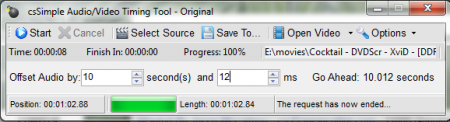
cssSimple Audi-Video Timing Adjustment comes with a very user friendly navigation and a simple interface. All the tabs and menus are present on the main window of the software. It does not come with a very stylish menu options but covers all the features in a simple yet compact window.
Using csSimple Audio-Video Timing Adjustment
To start using the software you need to select a source from the ”select source menu”. Once you click on menu you can select the file or the folder that you want to adjust. The main thing while making the adjustment is to decide the amount of changes required in the seconds or minutes box to bring the video and audio in proper sync. You just need to enter a specific number in the seconds and milliseconds box and the audio will be played accordingly. If the audio starts before the video then you can enter a positive number and make the audio come later. In case the audio is being played late then you can enter a negative number and the audio will be played sooner than its original timing.
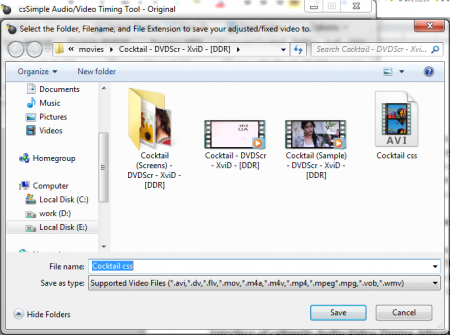
After you make a change and want to save the adjustment, you need to click on ”save to” option and save the video in your preferred location. You can even play the video through the menu ”open file” and see the change you have made. If you are not satisfied by the adjustment then you can again edit it in the software. After you make the adjustments you can see the progress rate in the timing and progress rate area.
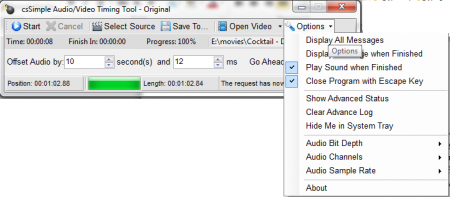
There is another tab named ”options”. It is a drop down menu and helps in making changes in the software, which could also be used for displaying all your messages from the software. If you want to play a sound when the adjustment is finished then select the option “play sound when finished” and if you want to close the software by the help of escape key then select the option “close program with escape key.” There are some useful options in the ”options” tab that can help you enhance the features in the software and make adjustments as per your choice. Overall, cssSimple Audio-Video Timing Adjustment is very simple while being used where you would get familiar with its functionality much faster than any other software in its league.
